




Instagram Two-Factor Authentication (2FA): How It Works, 3 Methods, and Security Setup
Instagram accounts may face security risks due to password leaks, suspicious login attempts, or device changes. Enabling …
Learn how to log in to ChatGPT on the web, desktop, and mobile apps, troubleshoot phone verification issues, and subscribe to or cancel ChatGPT Plus and Pro.

Get an AI-Powered Summary of This Article
ChatGPT is available through both the web version and desktop/mobile apps. The web version requires no installation and is convenient for quick or occasional access. The apps are better suited for long-term use and can provide easier access to device features such as voice input, cameras, microphones, and local files.
However, some users may encounter problems when logging in through the ChatGPT app, such as not receiving SMS verification codes or being unable to verify a phone number from their region. Beyond login issues, users may also want to know how to subscribe to ChatGPT Plus or Pro, which payment methods are available, and how to cancel a subscription.
This guide explains how to register and log in to ChatGPT on the web and through its apps, with a focus on what to do when you cannot receive a phone verification code. It also covers ChatGPT Plus/Pro subscriptions and how to cancel them.
ChatGPT apps are available for both mobile devices and computers, so you can choose the appropriate version for your device.
The mobile app is available for iPhone and Android and can generally be downloaded from the App Store or Google Play. The desktop app is available for Windows and macOS. You can visit the official ChatGPT download page to get the appropriate version.
After installation, open the ChatGPT app to access the login page.
The registration and login process is generally similar across the mobile and desktop apps:
Some users may be asked to provide a phone number during registration or login. This can depend on factors such as the account, region, and current platform requirements.
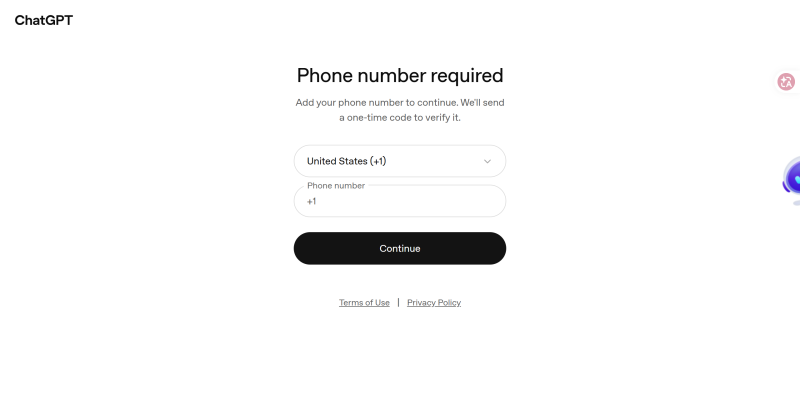
If ChatGPT does not support a particular region, users in that region may not be able to receive verification codes, and the corresponding country or region code may not appear on the verification page.
If your country or region is listed but you still cannot receive the verification code, first check that the phone number is correct and can receive SMS messages normally. Some virtual numbers and Google Voice numbers may not support ChatGPT verification or may fail to receive verification codes.
If the number itself appears to be working but verification still fails, you may need to use another eligible phone number.
If you cannot receive a ChatGPT verification code because of regional restrictions, number type, or SMS delivery problems, the appropriate solution depends on your situation.
If you already have a mobile number from another supported country or region, you can use a physical SIM card to receive the ChatGPT verification code.
A physical SIM can be useful for long-term use because the number is generally tied to a mobile subscription that you control. The same number can also be used later if you need to log in again, complete security verification, or receive other service messages.
However, this option has some limitations. You may need to purchase a SIM card from the relevant country or region, and additional costs may include mobile plans, roaming fees, identity verification, or number maintenance.
If you only need the number for a one-time ChatGPT verification, purchasing a physical SIM specifically for this purpose may require more time and expense than necessary.
Before using a physical SIM, also make sure that the number can receive international SMS messages. Some prepaid cards, data-only SIMs, or local-use numbers may not support messages from ChatGPT.
If your phone supports eSIM, you can also consider an electronic mobile number from the relevant country or region.
Unlike a physical SIM, an eSIM does not need to be inserted into your phone and can often be activated online. It can be convenient for people who travel frequently or need to use mobile numbers from different countries and regions.
However, not every eSIM supports SMS. Some eSIM plans provide mobile data only and do not include a phone number or SMS service.
Before purchasing an eSIM, check whether:
If an eSIM only provides mobile data and cannot receive SMS, it cannot be used to receive a ChatGPT phone verification code.
If you do not have a physical SIM or eSIM from a supported region but need a mobile number that can receive SMS, you can consider a cloud number.
Cloud numbers are provided and managed online, so you do not need a physical SIM card or necessarily need to change devices. For example, DuoPlus Cloud Numbers allow users to select numbers from different countries and regions and check received SMS messages through the platform.
Cloud numbers can be useful when you need online access to a number without purchasing and maintaining a physical SIM. Depending on the provider and number type, they can also provide more flexibility in terms of usage period and number management.
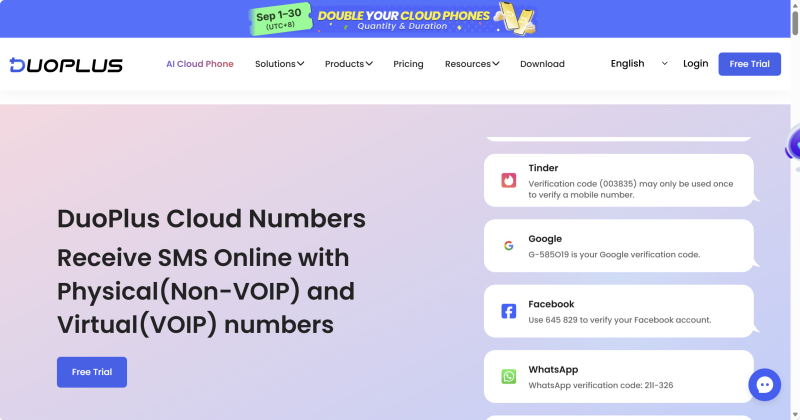
Cloud numbers may be suitable when:
Compared with a physical SIM, the process is generally simpler: select a number from the required country or region, confirm that it supports SMS reception, enter the number on the ChatGPT verification page, and check the verification code through the cloud number service.
Many SMS verification services provide temporary phone numbers for receiving one-time verification codes.
This method can be convenient when you only need to complete a one-time verification and do not expect to use the number again. However, temporary numbers are often available for a limited period and may have been used by other people. Reliability and privacy can also vary between providers.
If a verification code fails to arrive, the number has already been used, or the service stops providing access to the number, you may need to select another number and try again.
For services such as ChatGPT that may require verification again during future logins or security checks, relying entirely on a temporary number may be less convenient.
| Method | How It Works | Main Advantages | Things to Consider | Best For |
|---|---|---|---|---|
| Physical SIM | Use a physical mobile number | Generally stable and suitable for long-term use | Requires purchasing a SIM and may involve plan or roaming costs | Long-term use of a local phone number |
| eSIM | Use an electronic mobile number | No physical card required; convenient to activate and switch | Some eSIMs only provide mobile data and do not support SMS | Users who need a supported mobile number and have eSIM-compatible devices |
| Cloud Number | Obtain and manage a number online | No physical SIM required; flexible number selection and online management | Number type and SMS support need to be confirmed | Users who do not have a suitable local number or need flexible verification |
| Temporary SMS Service | Use a temporary number to receive a code | Simple and convenient for one-time verification | Short availability and limited long-term usability | One-time or temporary verification |
In general, physical SIMs and eSIMs are more suitable for users who want to keep a phone number long term. Temporary SMS services are designed for short-term verification, while cloud numbers can be useful for users who need online access to a number and more flexibility in how it is managed.
After logging in to ChatGPT, you can continue using the free plan. The free version can handle many everyday tasks, including conversations, information organization, writing, translation, and basic analysis.
However, free access may have limits on areas such as file uploads, message usage, model availability, and context length. Some advanced models and features may also be unavailable. Depending on current usage limits, access to certain models or features may become more restricted.
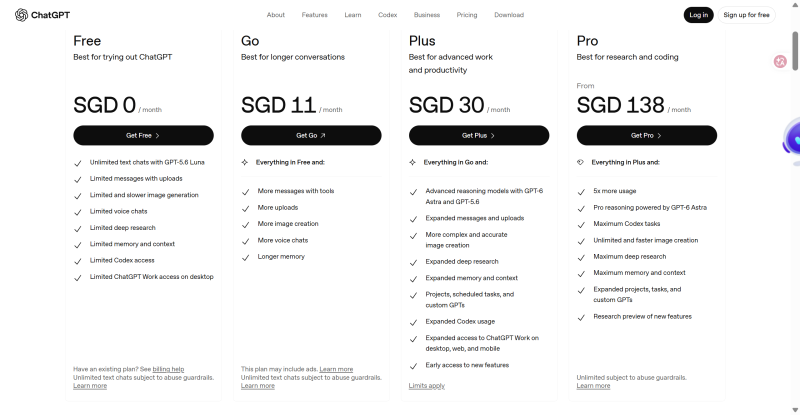
If you need higher usage limits, longer context, or access to additional features, you can consider a paid plan such as ChatGPT Plus or Pro.
For users in regions where ChatGPT services are officially available, subscribing through the web or app is usually straightforward. However, users in regions where ChatGPT is unavailable or where payment options are restricted may encounter additional issues, such as regional restrictions, unsupported cards, failed payments, or mismatched app store account regions.
Depending on your device and account, you may also see payment options through Apple App Store or Google Play in addition to direct web billing. The available methods depend on the account, region, platform, and current payment options.
ChatGPT Plus and Pro are both paid ChatGPT plans, but they may differ in areas such as usage limits, model access, available features, and pricing.
OpenAI may change its plans and pricing over time, so check the options displayed in your ChatGPT account before subscribing. Prices and payment methods may also vary depending on your region and purchase channel.
ChatGPT subscriptions may be available through the web, iPhone app, and Android app, depending on your account and region.
Web or direct subscription:
Log in to ChatGPT, open the upgrade or subscription page, select the Plus or Pro plan, and follow the on-screen instructions to complete payment.
If ChatGPT is unavailable in your region or your card or payment account cannot pass regional verification, direct payment may fail. In this situation, check whether your account region, billing address, and payment method are consistent and supported.
If payment continues to fail, you can check whether an in-app subscription option is available through Apple or Google Play.
iPhone App subscription:
Download ChatGPT from the Apple App Store and make sure your Apple Account region and available payment methods are supported.
Open ChatGPT, go to the upgrade section, and follow the instructions to subscribe through the App Store. The subscription is billed through your Apple Account, and you can later view or cancel the subscription under your iPhone subscription settings.
For users who cannot complete direct web payment, an App Store subscription may be another available option if supported by their account and region.
If your Apple Account does not have a supported payment method, Apple may offer other payment options depending on the account region, including account balance.
Android App subscription:
First, check your Google Account country or region and available payment methods. Then:
| Subscription Method | Payment Channel | Suitable For | Things to Consider |
|---|---|---|---|
| Web/direct subscription | ChatGPT payment system | Accounts with supported regions, billing information, and payment methods | May be affected by region, card, billing address, or payment verification |
| iPhone App subscription | Apple App Store | Users who can make purchases through their Apple Account | Apple Account region and payment method need to be supported |
| Android App subscription | Google Play | Users who can make purchases through Google Play | Google Account region, payment method, and in-app subscription availability may affect the purchase |
Regardless of which method you use, check the plan, price, regional requirements, and subscription status shown by ChatGPT, Apple, or Google Play at the time of purchase.
Also, make sure you know which platform is handling your subscription so that you do not accidentally purchase the same plan through multiple channels.
Deleting the ChatGPT app does not automatically cancel an active Plus or Pro subscription.
If you no longer want the paid plan, cancel the subscription through the platform where you originally purchased it:
The basic ChatGPT login process is straightforward, but phone verification can become more complicated when the phone number, region, or SMS service does not meet the current requirements.
Depending on your situation, you may use a physical SIM, eSIM, cloud number, or temporary SMS service. Cloud numbers can be an option for users who do not have a suitable local phone number but need online access to SMS messages.
After logging in, users who need paid ChatGPT features can subscribe through the web or supported app store channels and manage future renewals through the same purchase channel.
Not always. Whether phone verification is required depends on factors such as the account, region, and ChatGPT's current verification process.
Cloud numbers are mainly useful for receiving verification codes. Whether a specific number can be used for future logins depends on its validity period, SMS support, and whether ChatGPT accepts that number.
You can cancel automatic renewal, but you will generally retain access to the paid plan until the end of the current billing period. The exact end date depends on the purchase channel.
If you subscribed through the iPhone or Android app, you generally need to cancel the subscription through Apple App Store or Google Play subscription management, respectively.
Instagram accounts may face security risks due to password leaks, suspicious login attempts, or device changes. Enabling …

Mobile-first platforms like TikTok, Instagram and Facebook treat the phone as the main device. That’s why teams that run …
Instagram offers two types of Professional Accounts: Creator accounts and Business accounts. For content creators, …
No need to purchase multiple real phones.
With DuoPlus, one person can operate numerous cloud phones and social media accounts from a single computer, driving traffic and boosting sales for you.

