




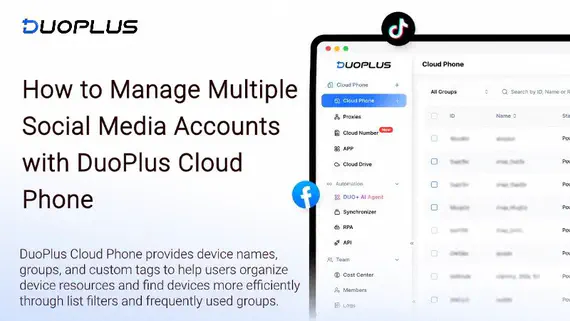
How to Manage Multiple Social Media Accounts with DuoPlus Cloud Phone: A Guide to Device Names, Tags, and Groups
As TikTok, Instagram, and Facebook become important channels for brand marketing, content creation, and affiliate …
Discover the best TikTok Viewer tools in 2026, including TTViewer, Urlebird, Picuki, Countik, and Exolyt. Compare features, limitations, and learn how DuoPlus Cloud Phone streamlines multi-account TikTok operations.

Get an AI-Powered Summary of This Article
TikTok has become one of the most important platforms for brands, eCommerce businesses, and content creators to reach new audiences. Whether you're researching trending topics, analyzing competitors, or discovering creators, reviewing public TikTok content and account data is an essential part of daily operations.
However, searching and browsing directly in the TikTok app isn't always the most efficient approach. As a result, more marketers and creators are turning to TikTok Viewer tools to explore public videos, profiles, hashtags, and account data without signing in.
In this guide, we'll explain what a TikTok Viewer is and introduce five TikTok Viewer tools worth trying for content research, competitor analysis, and creator discovery. We'll also show how combining a TikTok Viewer with DuoPlus Cloud Phone can bridge the gap between research and execution, making multi-account management more efficient.
A TikTok Viewer (also called a TikTok Viewer Tool) is a third-party online tool that allows users to browse public TikTok content without logging into a TikTok account.
Depending on the platform, a TikTok Viewer can help you:
For marketers, agencies, eCommerce sellers, and content creators, a TikTok Viewer is more than just a browsing tool. It helps identify industry trends, evaluate competitors, and uncover content ideas that can inspire future campaigns.
There are plenty of TikTok Viewer tools available today. Some focus on anonymous browsing, while others specialize in analytics, trend discovery, or competitor research.
Below are five free TikTok Viewer tools, each designed for different use cases.
Best for: Anonymous TikTok browsing
TTViewer is a lightweight TikTok Viewer that lets you browse public TikTok profiles, videos, and trending content without logging into a TikTok account. Its clean interface and simple design make it ideal for quickly viewing creator profiles or watching public videos.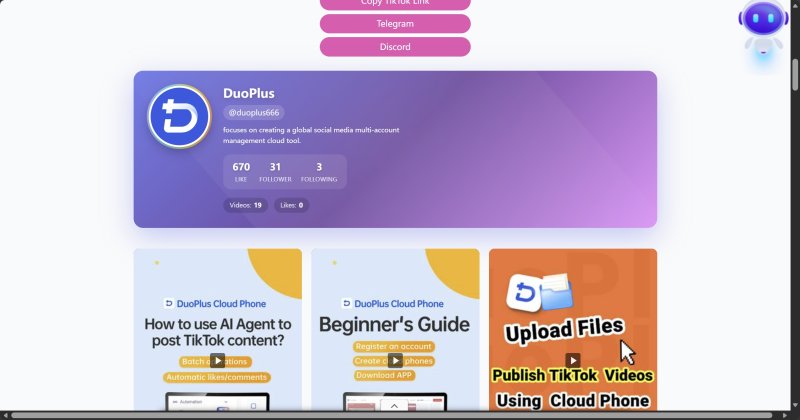
Best for: Trend discovery and competitor research
Urlebird is one of the most popular TikTok Viewer tools available. In addition to browsing public videos, it lets you explore trending hashtags, popular videos, and creator profiles, making it a great choice for discovering viral content and analyzing industry trends.
If you're researching trending videos in a specific niche or studying competitors' content strategies, Urlebird offers more useful discovery features than a standard TikTok browser.
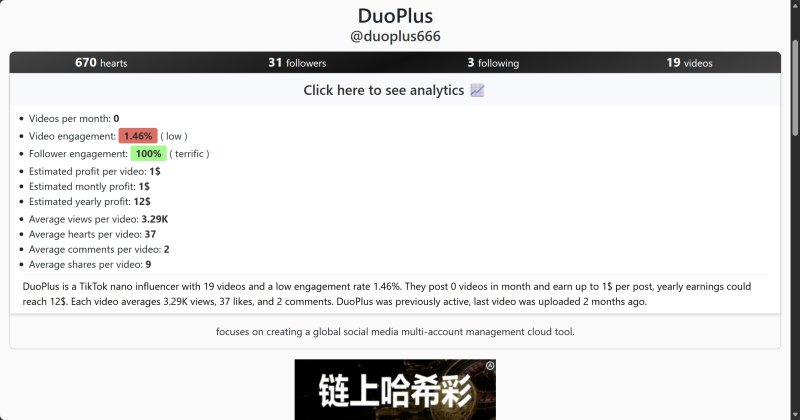
Best for: Video browsing and watermark-free downloads
ClapTik is a free online TikTok tool that lets you browse public videos and download them without watermarks. It's particularly useful if you want to save publicly available videos for content research or creative inspiration.
Keep in mind that downloaded content should always be used in accordance with TikTok's policies and applicable copyright laws.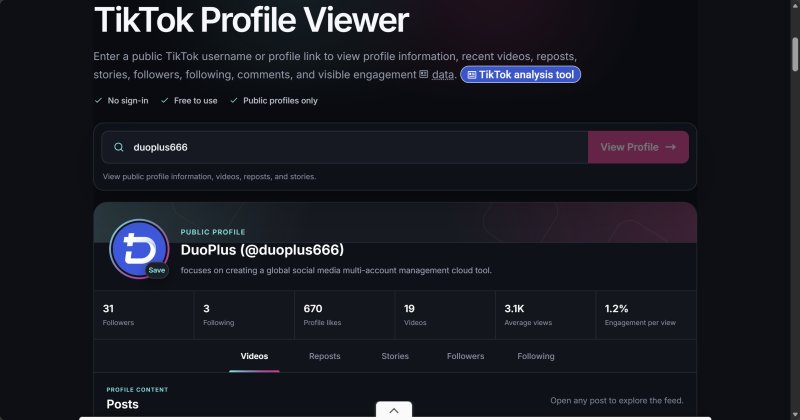
Best for: Real-time account analytics
If you're more interested in tracking account performance than browsing videos, Countik is a better fit.
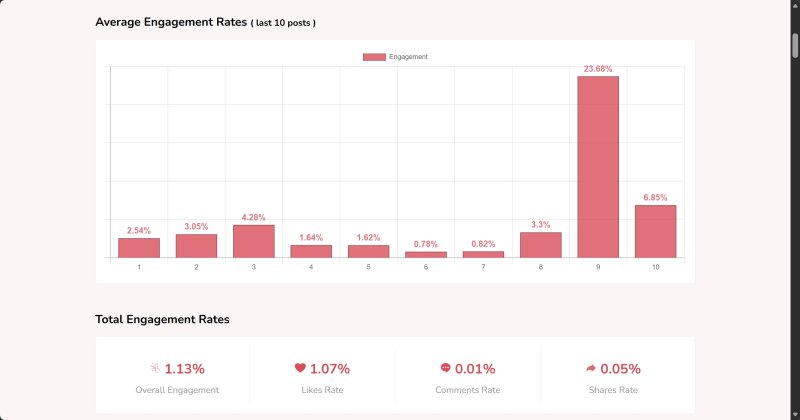
Unlike traditional TikTok Viewer tools, Countik focuses on public account analytics. It helps you monitor follower growth, likes, video views, and other public metrics over time, making it ideal for tracking competitors, creators, or brand accounts.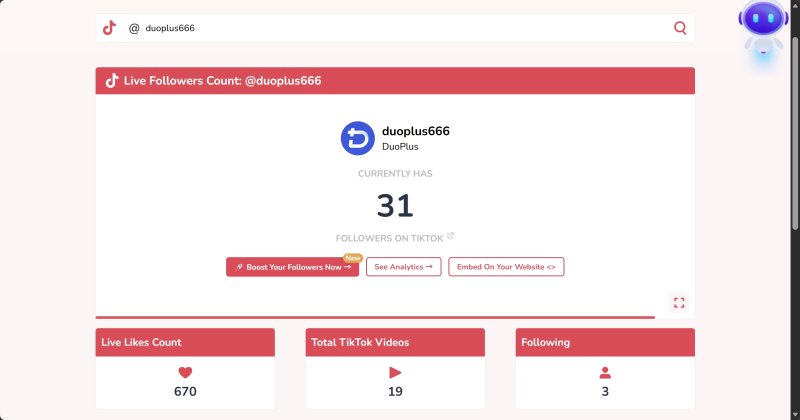
Best for: Quick TikTok content lookup
ClapTools offers a collection of free TikTok utilities, including a TikTok Viewer for browsing public profiles, videos, and basic account information. Its lightweight feature set makes it a good option for occasional lookups or quickly checking creator profiles.
If you don't need advanced analytics and simply want a fast way to browse public TikTok content, ClapTools is a practical alternative.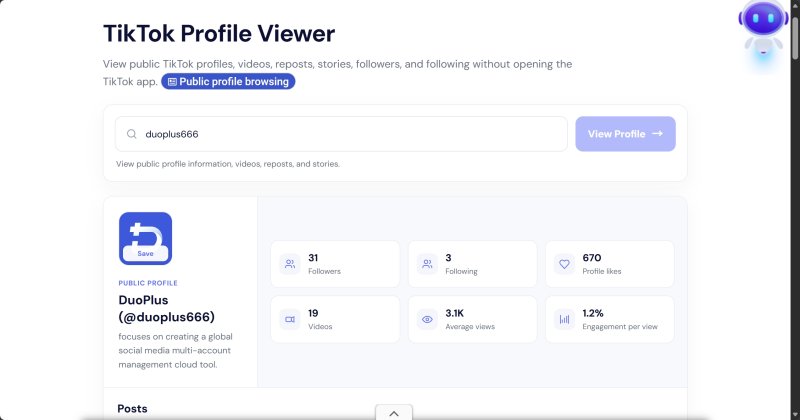
A TikTok Viewer makes it easy to discover trending videos, popular hashtags, and creators, making it a valuable tool for content research. However, for teams managing TikTok accounts over the long term, it only covers the research stage of the workflow.
For example, after finding trending keywords, collecting high-performing comments, or analyzing a competitor's content strategy, the next step is to apply those insights to your own TikTok accounts.
In practice, this often means manually copying keywords, comment templates, or video links, then logging into multiple TikTok accounts to search, publish, or engage with content. As the number of accounts grows, this repetitive process becomes increasingly time-consuming and inefficient.
Another common challenge is account management.
Frequently logging multiple TikTok accounts in and out on the same device—or using the same network environment—can increase the risk of account association. For brands, agencies, and creators managing multiple accounts, a TikTok Viewer alone isn't enough to solve these operational challenges.
This is where a cloud phone becomes useful. After completing your research with a TikTok Viewer, you can move directly into account operations using DuoPlus Cloud Phone. By combining content research with account management, you can streamline your workflow without constantly switching between different devices or tools.
With DuoPlus Cloud Phone, each cloud phone runs in an independent Android environment and supports its own proxy configuration. This allows each TikTok account to remain logged in on a dedicated device while reducing the need for repeated logins. Multiple cloud phones can also be managed from a single Dashboard, making content management, account maintenance, and team collaboration much more efficient.
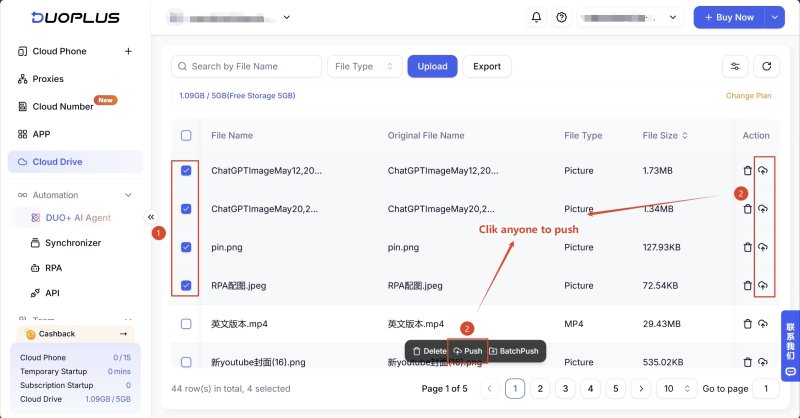
Once you've completed your research with a TikTok Viewer and prepared your content, simply upload your assets to the DuoPlus Dashboard and use RPA or DUO+ AI Agent to automate publishing across multiple accounts.
After editing your TikTok videos on your computer, it's recommended to organize them with clear filenames, such as AccountA_Video01.mp4, for easier distribution later.
In the DuoPlus Dashboard, click Cloud Drive from the left navigation menu and upload the videos you want to publish.
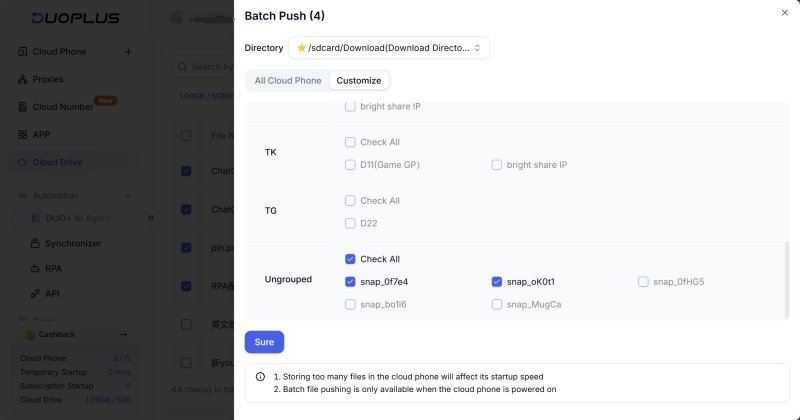
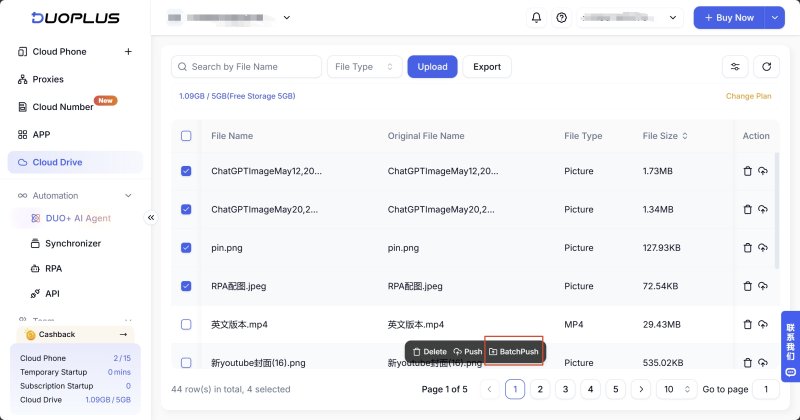
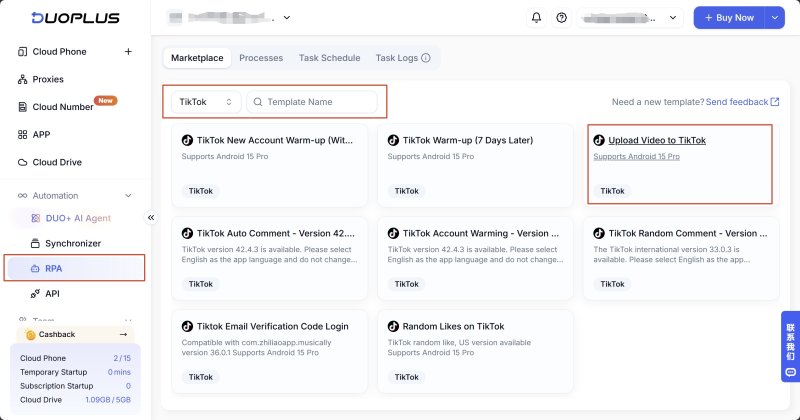
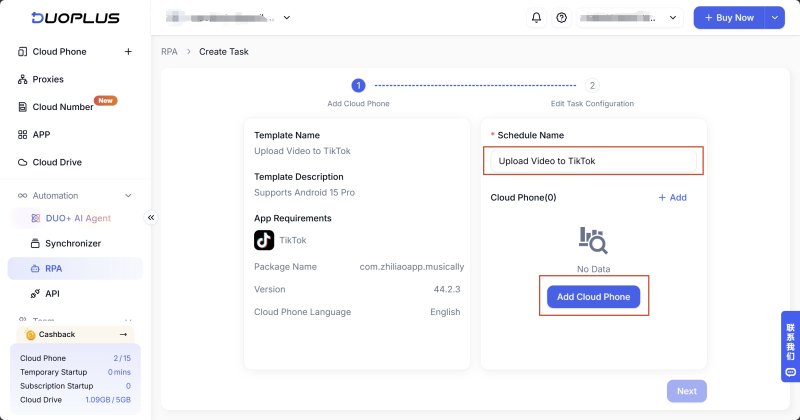

After the task finishes, you can review the Task Logs to check the task status, publishing time, execution duration, and detailed reports.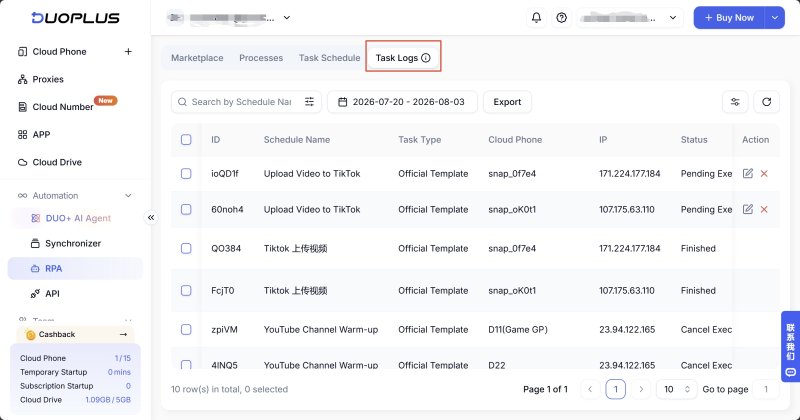
If the workflow is interrupted by page updates, network issues, or account verification, the execution report helps you quickly identify the problem and adjust the workflow if needed.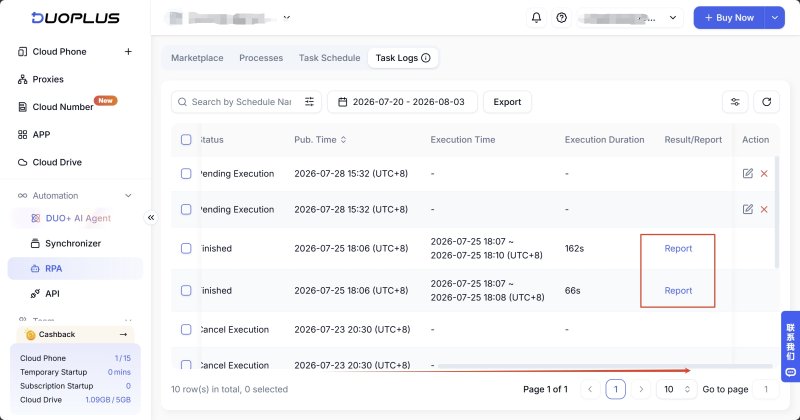
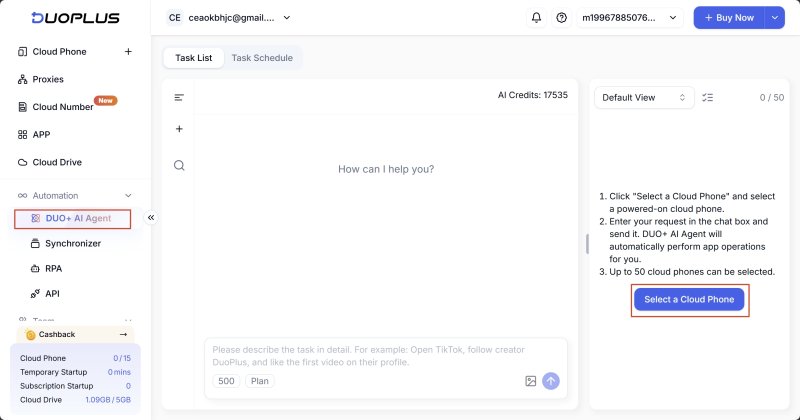
For example:
Open TikTok and create a new post. Set the video caption to "How to Use ChatGPT More Effectively", then upload the video file "ChatGPTImageMay12,2026,04_21_31PM.mp4" located in <span data-type="text">/sdcard/Download</span>.
The AI Agent will understand the instruction and complete the publishing process automatically.
TikTok Viewer provides content creators and marketing teams with an efficient way to research trending videos, analyze competitors, and discover new content ideas.
However, content research is only the first step. Turning those insights into real results requires a stable operating environment and efficient account management.
By combining TikTok Viewer with DuoPlus Cloud Phone, you can connect content research, multi-account management, and AI-powered automation into a single workflow, making your TikTok operations more efficient and easier to scale.
A TikTok Viewer is a third-party tool that lets you browse public TikTok profiles, videos, hashtags, and public account data. It's commonly used for content research, competitor analysis, and creator discovery.
In most cases, no. Most TikTok Viewer tools allow you to browse public content without signing in, although available features vary by platform.
No. TikTok Viewer tools are designed for browsing and analyzing public content. They do not support account login, video publishing, engagement, or multi-account management.
A TikTok Viewer is primarily used for content research, helping you discover trending videos, competitors, and industry insights.
DuoPlus Cloud Phone, on the other hand, provides independent Android environments for account login, content publishing, multi-account management, and AI-powered automation. The two tools serve different stages of the TikTok workflow and work well together.
DUO+ AI Agent can automate a wide range of repetitive TikTok tasks using natural language instructions, including browsing profiles, searching keywords, viewing creator content, publishing videos, and other routine account operations. This helps reduce manual work and improve efficiency when managing multiple TikTok accounts.
As TikTok, Instagram, and Facebook become important channels for brand marketing, content creation, and affiliate …

TikTok Shop gives sellers multiple ways to reach potential customers, from shoppable videos and livestreams to creator …
When managing multiple social media accounts, you often need to handle large amounts of text, including post captions, …
No need to purchase multiple real phones.
With DuoPlus, one person can operate numerous cloud phones and social media accounts from a single computer, driving traffic and boosting sales for you.

