





How to Sign Up for Meta Muse and Use a Referral Code
Muse has recently become one of the most talked-about AI Agent products in the AI tools space. As a new AI Agent from …
Learn the key differences between automated and human-led live streaming, and how to use DuoPlus Cloud Phone to manage accounts, networks, content, and automation for multi-account live streaming.

Get an AI-Powered Summary of This Article
Live streaming doesn't always require a host to be on camera. Automated live streaming uses pre-recorded content, scheduled tasks, and automation tools to keep streams running with less manual work.
This becomes especially useful when managing multiple accounts or live rooms. Instead of relying on separate physical devices, cloud phones provide a centralized way to manage accounts, networks, content, and streaming tasks.
In this guide, we'll compare automated and human-led live streaming and show how DuoPlus Cloud Phone can be used to build and manage a multi-account live streaming setup.
The main difference is how the content is produced and managed.
Human-led streaming requires a host to appear on camera, interact with viewers, answer questions, and adjust the stream in real time. It's a good fit for product demonstrations, live Q&A, and content that depends on direct interaction.
Automated streaming uses pre-recorded videos and scheduled tasks, reducing the need for continuous manual operation.
| Human-Led | Automated | |
|---|---|---|
| Content | Live, hosted in real time | Pre-recorded content |
| Interaction | Real-time | Limited or pre-set |
| Staffing | Requires a host | Less hands-on work |
| Scheduling | Depends on host availability | Can be scheduled |
| Scaling | Requires more hosts and devices | Multiple streams can run in parallel |
Automated streaming isn't simply about playing a video. The workflow can be broken down into content, devices, networks, and scheduled tasks, making it easier to standardize and scale.
However, automation isn't suitable for every type of stream. Content that relies heavily on real-time interaction or the host's personality may still work better with a human host.
A multi-account setup means running multiple live streaming accounts or live rooms at the same time.
Different accounts can target different audiences, content categories, or markets. Once you move beyond a single account, managing devices, networks, content, and schedules becomes much more important.
Accounts and devices Assign each account to a dedicated cloud phone to keep account and device management organized.
Network environments Configure an appropriate and stable network environment for each account and market.
Live content Store and organize videos centrally, then assign the right content to each account.
Streaming schedules Set start times, content playback, and other recurring tasks to reduce repetitive manual work.
Monitoring Track device status and scheduled tasks so problems such as connection issues or stopped streams can be handled quickly.
Running one automated stream with a physical phone is relatively simple. Managing dozens of accounts is a different story.
With physical devices, you may need to handle charging, network configuration, content transfers, app installation, and status checks across many phones.
Cloud phones move these devices into a centralized cloud environment.
With DuoPlus Cloud Phone, you can create and manage multiple cloud phones, configure network settings, distribute content, and automate repetitive tasks.
| Use Case | DuoPlus Cloud Phone |
|---|---|
| Multiple accounts | Multiple cloud phones running in parallel |
| Long-duration streaming | Scheduled content playback |
| Different markets | Separate network configurations |
| Content management | Centralized cloud storage and distribution |
| Automation | RPA, scripts, and API integrations |
A simple structure is:
One account → One cloud phone → Corresponding network → Scheduled tasks
This makes it easier to operate multiple live rooms independently and add more accounts as your setup grows.
The basic workflow is:
Create cloud phones → Configure environments → Upload content → Schedule tasks → Monitor
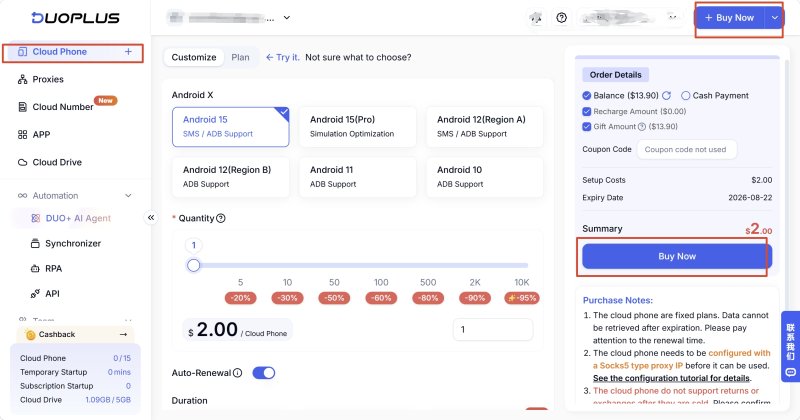
Create the number of cloud phones you need based on your accounts and live rooms.
DuoPlus supports bulk startup, shutdown, restart, configuration changes, and device management, making it easier to deploy multiple devices at once.
Configure the appropriate proxy, region, language, and time zone for each cloud phone.
DuoPlus supports bulk proxy imports, device-level IP binding, proxy pool management, and automatic switching.
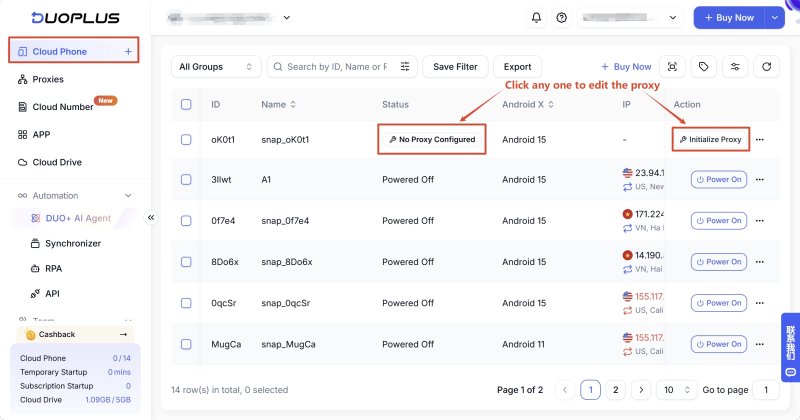

For ongoing operations, keep each account's device and network environment consistent rather than frequently changing settings.
Upload pre-recorded videos and other live content to cloud storage.
DuoPlus allows you to centrally manage content and distribute the appropriate videos to different cloud phones.
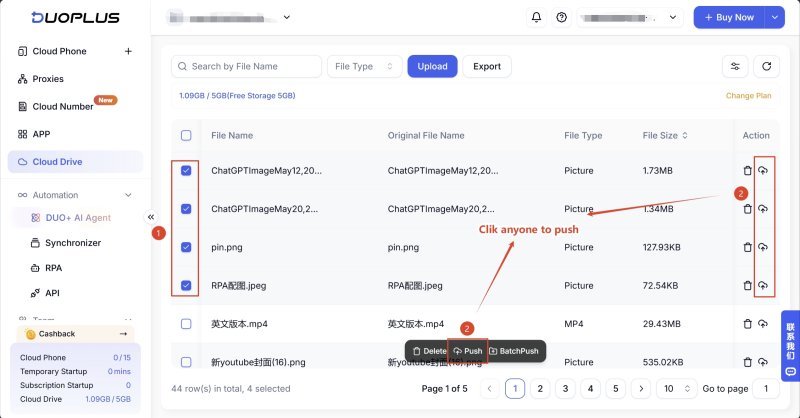
This can reduce repetitive content transfers when managing multiple accounts.
Create tasks for stream start times, video playback, and other recurring actions.
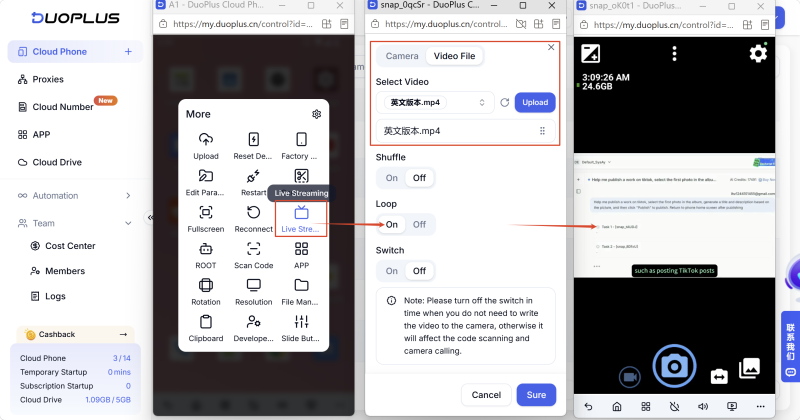
DuoPlus supports RPA as well as script and API integrations, allowing repetitive operations to be automated.
Once your streams are running, monitor device status and task execution.
DuoPlus provides device and task management tools that let you identify issues without checking every physical phone individually.
Automation reduces manual work, but it doesn't eliminate the need for monitoring.
Follow platform rules. Make sure your live content complies with the policies of the platform you're using.
Keep environments consistent. Avoid unnecessary changes to account, device, and network configurations during ongoing operations.
Monitor for errors. Network interruptions, app crashes, and stopped streams can still occur. Keep a process in place for detecting and handling these issues.
Human-led and automated live streaming serve different purposes. Human-led streaming is better for real-time interaction, while automated streaming works well for standardized content and longer-running sessions.
When multiple accounts and live rooms are involved, managing devices, networks, content, and schedules becomes increasingly important.
DuoPlus Cloud Phone provides independent cloud devices, network configuration, centralized content management, and RPA/API automation, giving teams a more centralized way to manage multi-account live streaming.
It depends on the content. Human-led streaming works better for real-time interaction and live Q&A, while automated streaming is more suitable for standardized content and longer sessions.
Not necessarily. Automated streams can use pre-recorded content and scheduled tasks instead of requiring a host to be on camera throughout the session. However, the level of human involvement depends on the content and platform rules.
Yes. DuoPlus provides independent Android cloud environments where you can install live streaming apps, configure network settings, manage content, and run multiple accounts in parallel.
Muse has recently become one of the most talked-about AI Agent products in the AI tools space. As a new AI Agent from …

OpenAI Codex is an AI coding agent designed to help developers write, modify, review, and deliver code. It is available …

VK (VKontakte) is one of the major social media platforms in Russia. In addition to account management, content …
No need to purchase multiple real phones.
With DuoPlus, one person can operate numerous cloud phones and social media accounts from a single computer, driving traffic and boosting sales for you.

