





How to Sign Up for Meta Muse and Use a Referral Code
Muse has recently become one of the most talked-about AI Agent products in the AI tools space. As a new AI Agent from …
Learn what Android Root is, how Root access works, what you can do with a rooted Android device, and the differences between Magisk, KernelSU, and APatch. Discover when Root is useful, why some apps require it, and how DuoPlus Cloud Phone supports both Global Root and Per-App Root for flexible Root management.

Get an AI-Powered Summary of This Article
Have you ever installed a game automation tool only to see the message:
"Root access is required."
Or perhaps you wanted to make a complete backup of an Android app, only to discover that some files couldn't be accessed.
Then, after enabling Root, another app suddenly warns that your device is rooted.
These seemingly contradictory situations are often where people first encounter Android Root.
Search online and you'll quickly run into terms like Magisk, KernelSU, APatch, Root modules, and LSPosed. For beginners, it's easy to confuse these concepts.
This guide explains how Android Root works, common Root solutions, use cases, and the differences between Global Root and Per-App Root, helping you understand Root from both a technical and practical perspective.
Android Root is the process of obtaining privileged (superuser) access to the Android operating system.
Because Android is built on Linux, it inherits Linux's user and permission model.
Under normal circumstances, every Android app runs inside its own sandbox with limited permissions. Apps can only access resources explicitly granted by the operating system.
When Root access is available, authorized processes can execute commands and access protected parts of the operating system that are normally restricted.
The Linux root user has a UID of 0, giving it unrestricted system privileges. Android Root essentially provides controlled access to that level of permission.
It's important to understand that Root is not an app.
Instead, it is a system capability provided through different Root solutions.
For example:
Root doesn't automatically change your phone. Instead, it allows authorized applications to perform operations that aren't possible under Android's standard security model.
Some of the most common use cases include the following.
With Root access, advanced tools can:
For many Android enthusiasts, this has traditionally been one of the biggest reasons to Root a device.
Android automation often relies on Accessibility Services or ADB.
However, some automation workflows require deeper system privileges, such as:
Typical scenarios include:
Not every automation task requires Root, but some advanced workflows simply cannot function without it.
Android's sandbox architecture prevents apps from accessing each other's private data.
With Root access, authorized tools can inspect protected directories, analyze app data, and interact with system resources that are normally unavailable.
Common examples include:
Exactly what can be accessed still depends on the Android version, device implementation, and the Root solution being used.
Root is particularly valuable for Android developers and QA engineers.
When an application behaves differently across Android versions or device manufacturers, Root makes it easier to inspect:
This helps developers identify whether issues originate from:
For development teams, Root is primarily a debugging and diagnostic tool.
One common misconception is that Root can be obtained simply by installing an app.
In reality, Root usually involves modifications to the Android boot process.
On most Android devices, the Bootloader is locked by default.
To install a custom Root environment, users typically need to:
Unlock the Bootloader → Obtain the original boot image → Patch the boot image → Flash the modified image → Reboot → Manage Root permissions
Depending on the device, Android version, and manufacturer, this process may also require wiping user data.
Because of these hardware-specific requirements, rooting physical Android devices often requires technical knowledge and ongoing maintenance.
Today, the three most widely used Android Root solutions are Magisk, KernelSU, and APatch.
Although all three provide Root access, their underlying architectures differ.
Magisk remains the most widely adopted Root solution.
It establishes Root by patching the boot image and provides:
Its mature ecosystem makes it the default choice for many Android users.
KernelSU implements Root directly inside the Linux kernel.
Compared with traditional Root solutions, it offers more fine-grained Root management and supports per-app Root authorization through App Profiles.
KernelSU is particularly attractive to developers and advanced users who need deeper control over Root behavior.
APatch is another kernel-based Root solution.
It modifies the Android kernel directly and provides its own extension framework, including APModule and KPModule.
It is generally aimed at experienced Android developers and advanced Root users.
| Root Solution | Highlights | Best For |
|---|---|---|
| Magisk | Boot image patching, mature module ecosystem | General users, developers |
| KernelSU | Kernel-based Root, App Profiles | Advanced users, Android development |
| APatch | Kernel patching, extension framework | Advanced users, developers |
It's worth noting that Root implementations continue to evolve alongside Android releases, Linux kernels, and device manufacturers.
If an application only requires su access, granting Root permission is usually sufficient.
Only when additional system behavior needs to be modified or extended do you typically need to install Root modules.
Obtaining Root access isn't always the final goal.
In many real-world environments, not every application should run with Root privileges.
For example, a single Android device may contain:
An automation tool may legitimately require Root to perform system-level tasks.
However, social apps, banking apps, or productivity software generally do not require Root and may even detect rooted environments.
This makes Root permission management increasingly important.
Managing Root on physical Android devices becomes increasingly difficult as the number of devices grows.
Every device may require:
Cloud phones simplify this process by turning Root into a configurable capability rather than a manual setup procedure.
DuoPlus Cloud Phone currently provides two Root modes.
Global Root enables Root across the entire virtual Android device.
Typical use cases include:
No manual rooting or flashing is required.
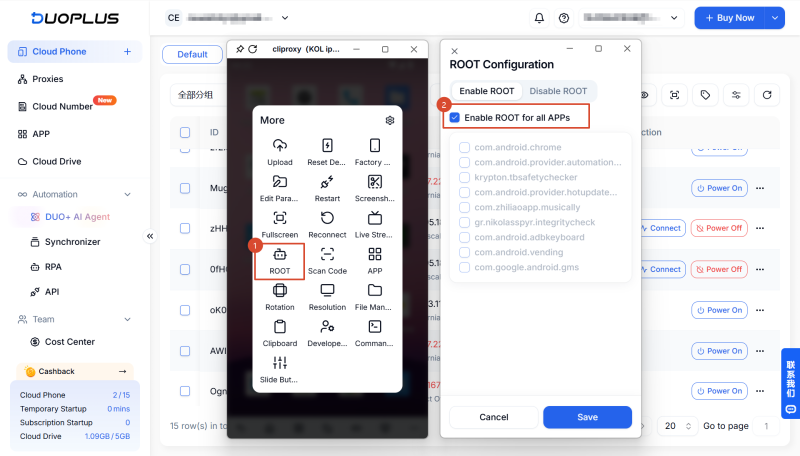
In many scenarios, only one specific application actually needs Root.
Per-App Root allows Root access to be granted only to selected apps based on their package name, while every other application continues running without Root privileges.
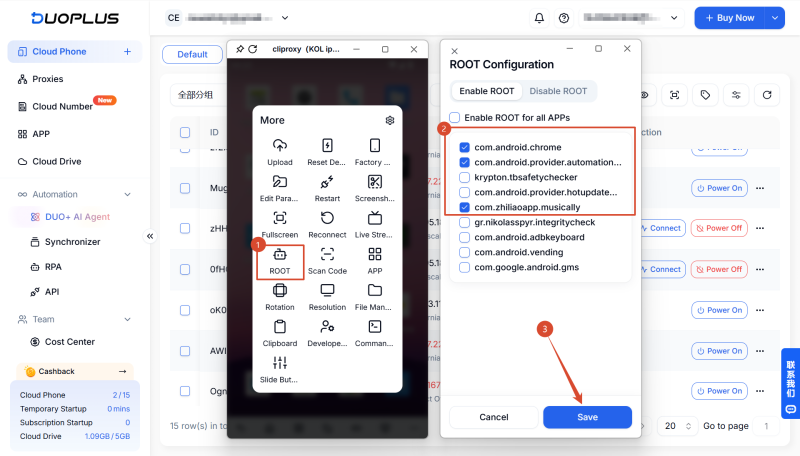
This approach offers better flexibility, minimizes unnecessary Root exposure, and is particularly useful when different applications have different security requirements.
Root remains one of Android's most powerful capabilities for development, automation, testing, and advanced system customization.
Rather than treating Root as a simple on/off switch, modern Android workflows increasingly focus on managing Root permissions intelligently.
With support for both Global Root and Per-App Root, DuoPlus Cloud Phone makes it easier to deploy Android environments that match different business and development needs without the complexity of rooting physical devices.
Android Root provides privileged system access that allows authorized applications to perform advanced operations such as modifying system files, accessing protected data, running privileged Shell commands, and enabling advanced automation.
Root itself does not erase data. However, unlocking the Bootloader—a common prerequisite for rooting many physical Android devices—often performs a factory reset, so backing up important data beforehand is recommended.
Yes. DuoPlus Cloud Phone supports both Global Root and Per-App Root, making it suitable for Android development, testing, automation, and other scenarios requiring elevated privileges.
Global Root enables Root across the entire Android environment.
Per-App Root grants Root access only to selected applications while keeping all other apps running without Root privileges, providing finer-grained permission management.
Muse has recently become one of the most talked-about AI Agent products in the AI tools space. As a new AI Agent from …

OpenAI Codex is an AI coding agent designed to help developers write, modify, review, and deliver code. It is available …

VK (VKontakte) is one of the major social media platforms in Russia. In addition to account management, content …
No need to purchase multiple real phones.
With DuoPlus, one person can operate numerous cloud phones and social media accounts from a single computer, driving traffic and boosting sales for you.

