





How to Automate X Posts with DuoPlus RPA Templates
When managing X (Twitter) accounts, some daily tasks need to be repeated, such as publishing posts, checking task …
Android device spoofing often involves rooting, flashing ROMs, or modifying device identifiers such as the Android ID and IMEI. But do these methods really create a new Android device environment? This guide explains the difference between device spoofing and a complete Android environment, why spoofing has become more difficult, and what matters for long-term multi-account management.

Get an AI-Powered Summary of This Article
Managing multiple mobile accounts often begins with the same question:
Can I simply modify my Android device so every account appears to come from a different phone?
Many users try one of these approaches:
At first glance, changing identifiers such as the IMEI, Android ID, device model, or brand seems enough to make an application recognize the device as "new."
However, many users eventually discover that some apps still request additional verification, while others continue recognizing the device despite the modified parameters.
The reason is simple:
Changing device parameters and creating a brand-new Android device environment are two completely different things.
Android device spoofing(also called Android spoofing) refers to modifying certain hardware identifiers, system properties, or operating system configurations so that apps perceive a device differently.
Depending on the tool being used, Android spoofing may include:
Each method changes different parts of an Android device, and none of them automatically creates a brand-new device environment.
Flashing replaces or reinstalls the Android operating system.
Examples include:
Although flashing changes the operating system itself, it does not automatically replace every hardware identifier or application state stored on the device.
Android normally restricts applications from modifying protected system files.
By rooting a device, users gain elevated system privileges, allowing them to:
Rooting is commonly used together with Android spoofing tools, but root access alone does not create a new Android device identity.
In fact, rooting may also affect the device's integrity status.
Many Android spoofing tools primarily modify device identifiers such as:
A common misconception is that changing the IMEI creates a brand-new device.
In reality, the IMEI is only one identifier among many.
Changing it does not automatically modify the GPU, system image, boot status, application data, hardware-backed security information, or numerous other characteristics that modern applications may evaluate.
Since Android 10, access to permanent hardware identifiers has also become significantly more restricted.
Factory resetting and clearing app data are also frequently considered part of Android spoofing.
Clearing application data removes:
A factory reset goes further by removing user accounts, installed applications, and most local files.
However, neither operation changes the device's hardware identity nor removes server-side records maintained by online platforms.
A factory reset creates a clean local device—not a completely new Android environment.
Earlier Android applications generally relied on far fewer signals when identifying devices.
Older Android applications could easily access information such as:
If an application mainly depended on one or two identifiers, changing those values often altered the device identity it perceived.
Many early Android applications only needed to determine:
When only a small number of identifiers mattered, changing those values or clearing application data could successfully make the device appear new.
Several years ago, modifying a few device identifiers was often enough to make an Android device appear "new" to many apps. Today, that approach is far less reliable.
The biggest reason is that Android security has evolved significantly.
Modern Android devices no longer rely on a single identifier such as the IMEI or Android ID. Instead, apps increasingly evaluate the entire device environment, combining information from hardware, the operating system, application data, network settings, and integrity verification services.
Several industry changes have accelerated this shift:
Many Android apps now rely on the Google Play Integrity API, which helps determine whether a device is running in a trusted environment.
Instead of checking only device identifiers, Play Integrity evaluates whether the system appears genuine, whether the bootloader has been modified, and whether the operating environment matches Google's security expectations.
Older Android anti-fraud systems commonly relied on SafetyNet Attestation.
Although SafetyNet has largely been deprecated in favor of Play Integrity, many developers have also moved from checking individual identifiers to evaluating the overall device environment.
Newer Android devices increasingly support hardware-backed attestation, allowing security information to be verified through secure hardware rather than software alone.
As a result, simply changing a few device parameters is no longer enough to recreate a brand-new Android environment.
For applications that emphasize security—such as social media platforms, financial apps, messaging apps, and marketplaces—the consistency of the overall device environment has become far more important than any single identifier.
For example, changing a Samsung Galaxy S24 Ultra into a Google Pixel 9 Pro by modifying its model information may make the device appear more realistic.
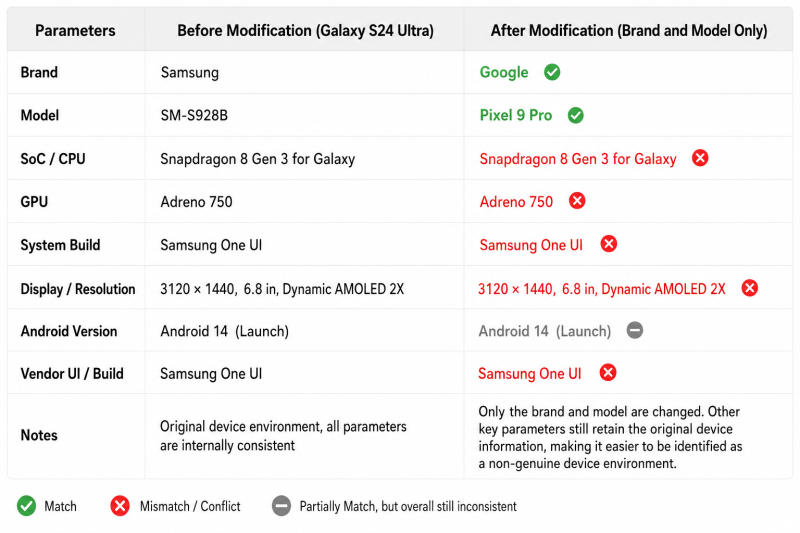
However, matching device parameters does not necessarily create a consistent Android device fingerprint.
Device identifiers are only one component of a complete Android device environment.
During everyday use, Android continuously generates additional system state, including:
Some of this information exists inside the operating system, some inside applications, and some on remote servers.
Even if device parameters appear consistent, inconsistencies elsewhere can still expose that the environment has changed.
In practice, the difficult part of Android spoofing is not changing identifiers.
It is maintaining consistency across the entire Android operating environment every time modifications are made.
Traditional Android spoofing works by repeatedly modifying an existing device.
Every modification increases the need to verify that device identifiers, application data, regional settings, and network configuration remain consistent.
For teams managing multiple mobile accounts over long periods, a more reliable approach is to create independent Android environments from the beginning.
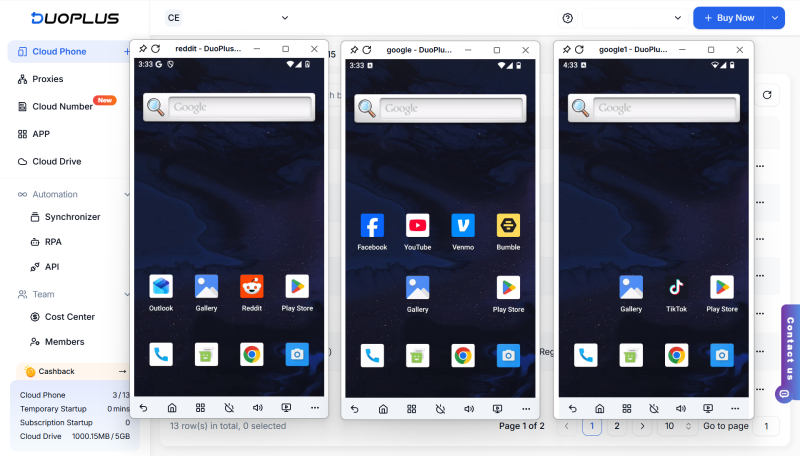
Instead of repeatedly spoofing a single device, cloud phones create isolated Android instances, each with its own operating environment.
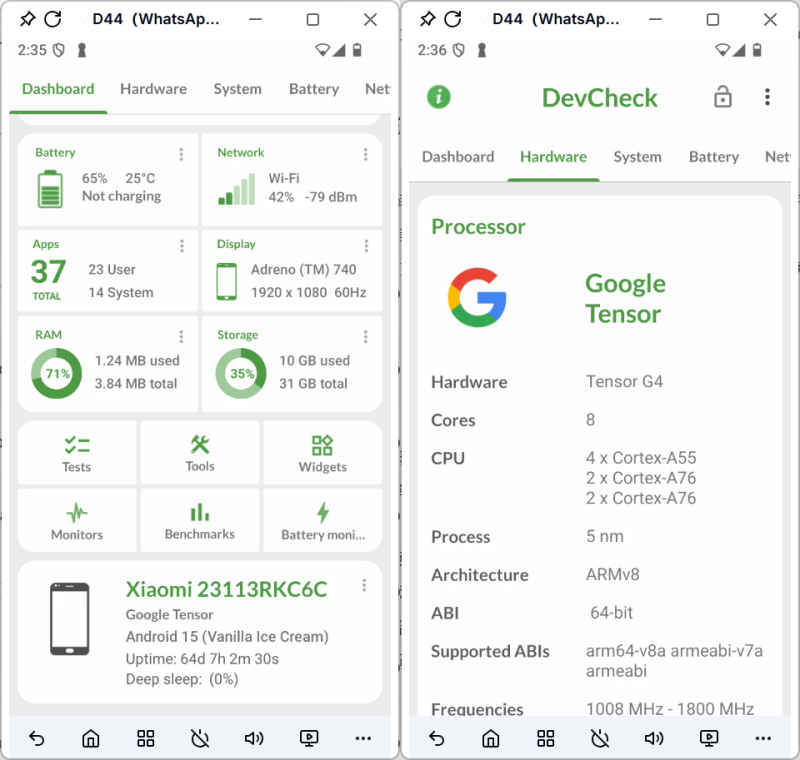
Using DuoPlus Cloud Phone as an example, every cloud phone provides:
Because each cloud phone maintains its own Android device fingerprint and application environment, accounts remain isolated without repeatedly modifying the same physical device.
Android device spoofing is still useful for device testing, development, and short-term experiments.
However, modifying device parameters is no longer enough to create a completely new Android environment.
For long-term multi-account management, the real challenge is maintaining consistency across device identifiers, application data, operating system state, network configuration, and regional settings.
Rather than continuously modifying one device, using independent Android environments provides a more stable foundation for managing multiple mobile accounts over the long term.
When managing X (Twitter) accounts, some daily tasks need to be repeated, such as publishing posts, checking task …
An app may work perfectly on a developer's smartphone but suddenly crash on another device, display the wrong currency, …
Telegram is a messaging app many people use for everyday conversations, joining communities, and communicating with …
No need to purchase multiple real phones.
With DuoPlus, one person can operate numerous cloud phones and social media accounts from a single computer, driving traffic and boosting sales for you.

