





How to combine an antidetect browser and cloud Android for multi-accounting
An antidetect browser gives each account in multi-accounting a separate web environment. This reduces overlap between …
Learn what Android automation is, why it matters. Explore common Android automation use cases and modern AI-powered solutions.

Get an AI-Powered Summary of This Article
Imagine people perform countless tasks on Android devices—opening apps, checking notifications, switching between accounts, collecting information, responding to messages, and completing routine workflows.
While these actions may seem simple, they often consume significant time when repeated across multiple devices, applications, or accounts.
This is why Android automation has become increasingly important. Instead of handling every repetitive action manually, Android automation helps teams simplify mobile operations and keep work moving faster. In this guide, you'll learn how Android automation works, where it delivers the most value, and how businesses are using it to streamline mobile operations.
Android automation is the use of software, scripts, or AI-powered tools to make Android tasks run with less manual effort. Instead of depending on repeated human input, it turns mobile actions into a more controlled and repeatable process.
What makes Android automation useful is not just speed, but the way it changes how mobile work is managed. It is typically built around a few key characteristics:
In other words, Android automation is not just about replacing clicks. It is about building a more structured way to handle Android workflows so they are easier to control, monitor, and grow.
A growing share of everyday digital operations now happens inside Android apps. Social media management , customer communication, content publishing, and account handling are no longer limited to desktop software.
As mobile usage keeps rising, businesses need ways to automate work where that work actually happens: inside Android environments.
Many Android workflows are not difficult, but they are repetitive. Checking account status, switching between apps, monitoring notifications, and completing routine actions can take up a surprising amount of time when done manually.
The issue is not complexity. It is the amount of repeated attention these tasks require.

Managing one Android device is simple. Managing dozens or even hundreds of devices or environments is a very different challenge.
As operations grow, manual handling becomes harder to maintain and more expensive to run. That is why Android automation is becoming less of a convenience and more of a practical requirement for growing teams.
Android automation works by allowing software to perform actions that would normally require manual interaction on an Android device.
Depending on the solution, automation can range from simple rule-based workflows to AI-powered systems capable of understanding instructions and executing tasks automatically.
Typical automation processes may involve opening apps, navigating interfaces, entering information, switching between accounts, or completing repetitive workflows.
The goal is not simply to automate individual actions, but to reduce the amount of manual effort required to complete recurring mobile tasks.
Android automation is useful anywhere mobile workflows are repetitive, high-volume, or operationally sensitive. Its value becomes especially clear when teams need to manage many accounts, devices, or routine app-based tasks, especially in marketing automation workflows where speed and consistency matter.
Some common use cases include:
These examples all point to the same underlying need: when mobile operations become repetitive enough, automation becomes far more practical than manual handling. The challenge, however, is finding an eazy way to implement automation without unnecessary complexity.
While the benefits of Android automation are clear, implementing automation has traditionally required specialized tools, complex workflows, or technical expertise. DuoPlus takes a different approach.
Instead of building automation workflows from scratch, users can simply describe the task they want to complete. DuoPlus AI Agent can then execute actions directly within a cloud-based Android environment, helping automate repetitive mobile operations without requiring coding knowledge.
Traditional automation often requires users to define every step of a workflow.
With DuoPlus AI Agent, users can simply provide instructions, and the AI Agent can carry out tasks directly within an Android environment.
This makes Android automation more accessible to teams that want the benefits of automation without the complexity of building and maintaining automation systems.
DuoPlus combines AI Agents with cloud phone technology, allowing businesses to automate Android operations across multiple cloud-based devices.
Instead of relying on physical smartphones, teams can manage Android workflows in dedicated cloud environments that are easier to scale and maintain.
Whether it's managing social media accounts, supporting marketing automation workflows, monitoring app activity, or handling routine Android tasks, businesses can use AI Agents to reduce manual effort and improve operational efficiency.
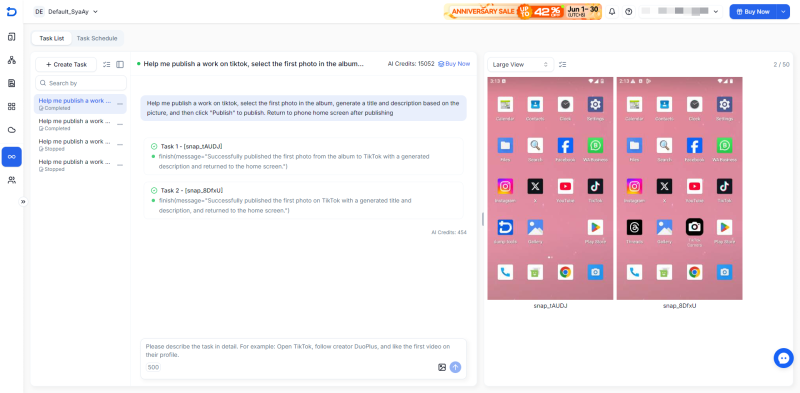
Android automation is becoming an essential part of modern mobile operations. Whether you're managing multiple accounts, monitoring app activity, or streamlining repetitive tasks, Android automation can help reduce manual effort and improve operational efficiency. And as AI-powered tools become more accessible, implementing Android automation is becoming easier than ever.
Is Android automation only for developers?
No. While traditional Android automation often required scripts or technical knowledge, many modern solutions use visual workflows or AI Agents that allow users to automate tasks without coding experience.
Can Android automation be used for multiple accounts?
Yes. Android automation is commonly used for multi-account operations. Businesses, agencies, and creators often use automation to simplify repetitive tasks across multiple accounts, helping improve efficiency while reducing manual effort.
How does DuoPlus support Android automation?
DuoPlus supports Android automation through cloud phone infrastructure, automation tools like RPA, API, and Android ADB, and DUO+ AI Agent, which helps turn instructions into executable mobile workflows.
An antidetect browser gives each account in multi-accounting a separate web environment. This reduces overlap between …
An app working correctly on a developer's Android phone does not necessarily mean it will work properly for users after …

Reddit is a community-driven social platform where users can join different Subreddits, publish posts, reply to …
No need to purchase multiple real phones.
With DuoPlus, one person can operate numerous cloud phones and social media accounts from a single computer, driving traffic and boosting sales for you.
