




What Is an X (Twitter) Shadowban? How to Check Search Restrictions and Restore Visibility
If engagement suddenly drops after you post on X (formerly Twitter), your account cannot be found in search, or a new …
Learn how to verify overseas ads across different countries by testing IP, GPS, language, device settings, and landing pages. Discover practical regional ad verification methods and how DuoPlus Cloud Phone helps simulate real local user environments for multi-region advertising tests.

Get an AI-Powered Summary of This Article
Getting an ad approved doesn't guarantee that users in every target market will see the correct version. Depending on a user's location, language, device settings, or network environment, the same ad may lead to different landing pages, display incorrect content, or even fail to open the app store. If these issues aren't discovered until after launch, they can negatively impact user experience and waste advertising budget.
That's why regional ad verification is an essential step before launching international campaigns. By simulating the environment of users in different countries, advertisers can verify ad delivery, landing page behavior, app download flows, and localized content in advance, reducing risks before campaigns go live.
Most advertising platforms target users based on factors such as country, language, device type, and audience segments. As a result, users in different regions often see different versions of the same advertisement.
For example:
Without proper testing, campaigns may begin spending budget while users encounter incorrect languages, broken landing pages, or failed download links, reducing conversion rates.
Regional ad verification allows advertisers to simulate real users in their target markets before launch, identify problems early, and make necessary adjustments before campaigns go live.
Regional testing involves more than confirming whether an advertisement appears. The entire user journey should be validated.
First, confirm that the advertisement displays as expected:
If the ad doesn't appear, verify whether regional targeting, audience settings, or device conditions are responsible.
After clicking the advertisement, check whether the landing page behaves correctly:
Many conversion problems are caused not by ad creatives, but by localization or landing page configuration issues.
For app and mobile game campaigns, test the complete installation journey:
Testing the complete workflow ensures users won't drop off because of technical issues.
Advertising platforms evaluate more than IP addresses. They may also consider device-related signals, including:
| Verification Item | What to Check |
|---|---|
| IP Address | Matches the target country or region |
| GPS Location | Consistent with the target location |
| System Language | Uses the local language |
| Time Zone | Matches local time |
| Device Type | Android or iOS matches campaign targeting |
| Login Account | Fits the intended audience segment |
Only when these settings align can the testing environment closely resemble real local users.
Creating an environment that closely matches real users is the foundation of regional ad verification. The most common approaches include physical devices with VPNs, antidetect browsers, and cloud phones.
Using a real smartphone together with a VPN is one of the most common testing methods.
By connecting to a VPN server in the target country, advertisers can verify landing pages, localized content, and some ad placements while testing directly inside apps like Facebook, Instagram, or TikTok.
Advantages
Limitations
Antidetect browsers simulate different browser environments by assigning unique browser fingerprints, proxy IPs, and cookies to each profile.
They work well for website testing, landing pages, and web account management but are designed primarily for browser-based scenarios rather than mobile applications.
Advantages
Limitations
A cloud phone provides a complete Android environment similar to a physical smartphone. It can install and run apps such as Facebook, Instagram, and TikTok while also supporting browser-based testing.
Unlike physical devices, cloud phones run remotely in the cloud and can be accessed through a browser or desktop client. Each device can maintain independent proxy settings, GPS location, language, and time zone, making them ideal for long-term multi-region testing.
Advantages
Limitations
| Feature | Physical Device + VPN | Antidetect Browser | Cloud Phone |
|---|---|---|---|
| Environment Realism | ⭐⭐⭐⭐⭐ | ⭐⭐⭐ | ⭐⭐⭐⭐⭐ |
| Website Ad Testing | ✅ | ✅ | ✅ |
| In-App Ad Testing | ✅ | ❌ | ✅ |
| Multi-Region Efficiency | ⭐⭐⭐ | ⭐⭐⭐⭐ | ⭐⭐⭐⭐⭐ |
| Device Management | ⭐⭐⭐ | ⭐⭐⭐⭐⭐ | ⭐⭐⭐⭐⭐ |
| Best For | Small-scale testing | Website verification | Long-term multi-region mobile testing |
If you only test one or two countries occasionally, a physical device is usually sufficient. For website verification, an antidetect browser works well. For ongoing campaigns across multiple regions, cloud phones offer the greatest flexibility.
When testing advertisements across multiple countries, cloud phones allow you to create dedicated environments for each region before verifying ad delivery, landing pages, and localized content.
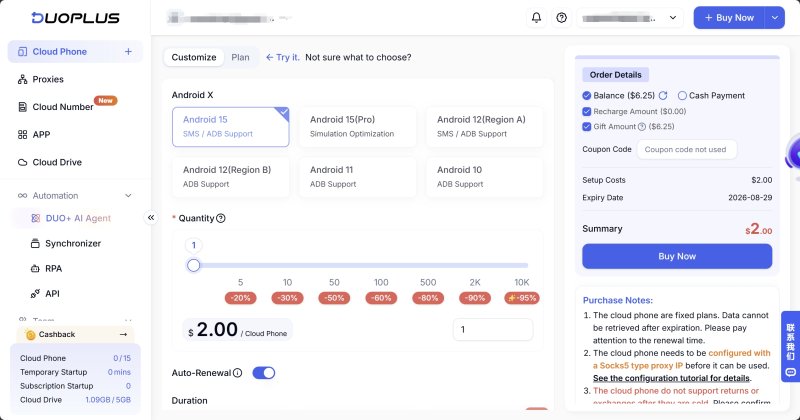
Using DuoPlus Cloud Phone as an example, the workflow typically includes the following steps.
Create a new cloud phone for your target country.
Under Initialize Proxy, configure:
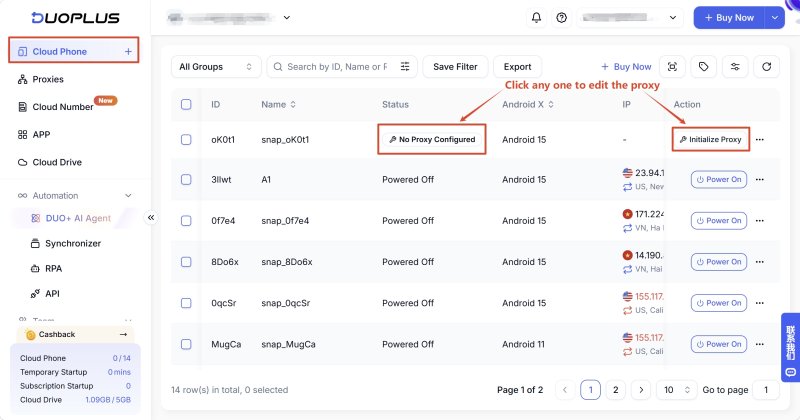
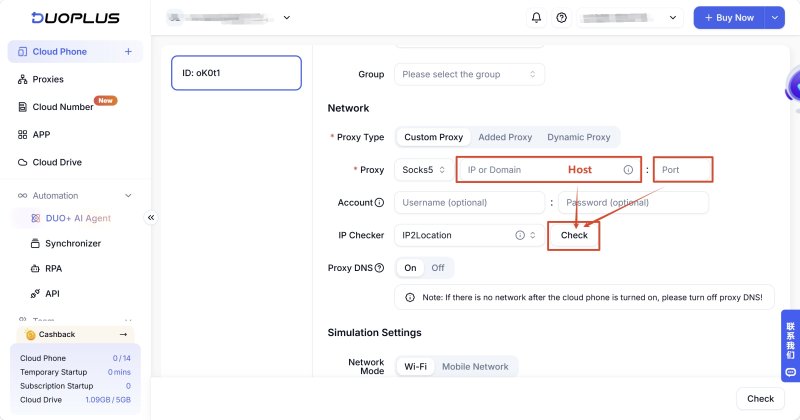
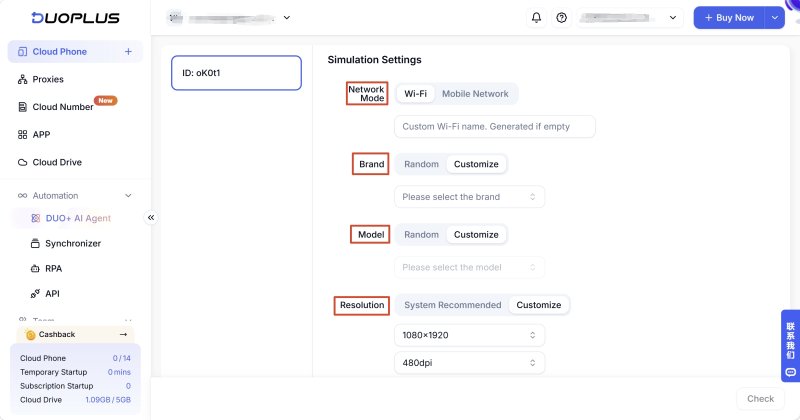
These settings help simulate a realistic local user environment.
After configuration, sign in using the appropriate testing account and verify your advertisements.
If multiple countries or ad versions need testing, DuoPlus supports running several cloud phones simultaneously. For example, you can open devices configured for the United States, Japan, and Germany at the same time to compare ad delivery, landing pages, and localization without constantly switching devices.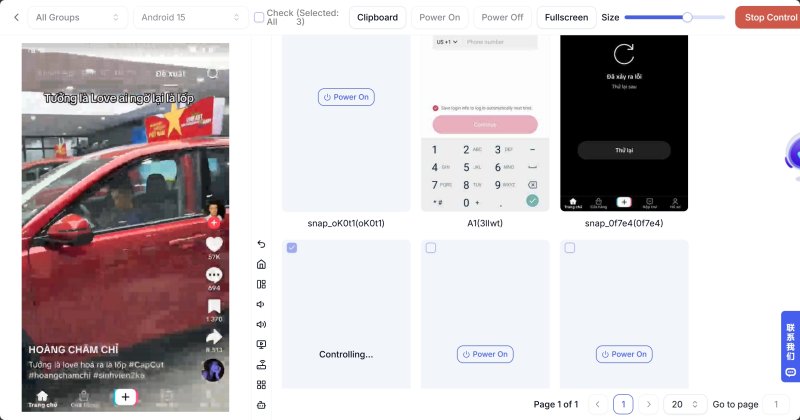
This significantly improves testing efficiency for advertisers managing multiple campaigns.
Regional ad verification should continue after campaigns go live.
Regularly verify:
For ongoing campaigns, DuoPlus also supports automation features such as:
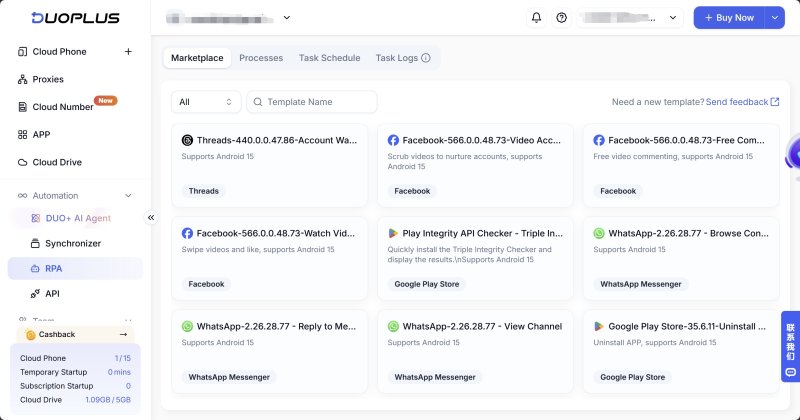
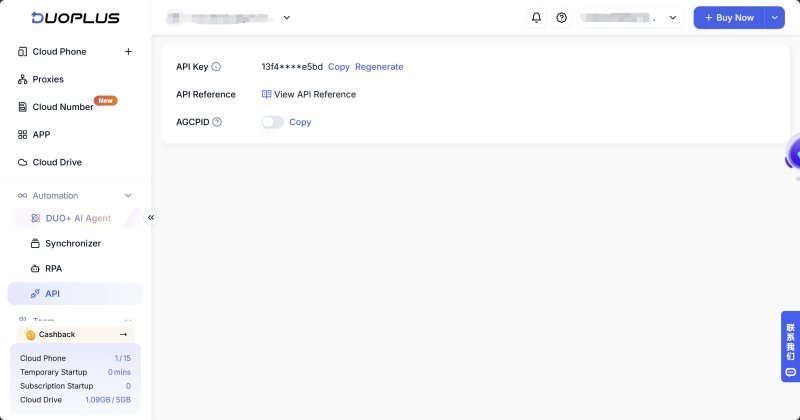
By combining automation with cloud-based testing, advertisers can replace repetitive manual verification with scalable, multi-region workflows.
Successful international advertising requires more than simply launching campaigns. Ad delivery, landing pages, localization, and regional user experiences should all be verified under realistic conditions.
While physical devices and antidetect browsers work well for smaller testing scenarios, cloud phones provide greater flexibility for large-scale, multi-region campaigns.
By configuring regional proxy IPs, GPS locations, languages, and time zones, DuoPlus Cloud Phone enables advertisers to build realistic testing environments and streamline regional ad verification with centralized management and automation.
A VPN only changes your IP address. Advertising platforms may also consider GPS location, system language, device settings, time zone, and account information when determining which ads to display.
At minimum, verify:
Yes, but it's mainly suitable for website ads and landing pages. To verify ads inside apps like Facebook, Instagram, or TikTok, you'll need a real mobile environment such as a physical device or cloud phone.
Both provide real Android environments. The main difference is deployment: physical phones require hardware, while cloud phones run remotely and are easier to scale, manage, and share across teams.
For occasional testing, physical devices are sufficient. For website verification, antidetect browsers work well. For long-term, multi-country campaigns involving both websites and mobile apps, cloud phones offer the most efficient and scalable solution.
If engagement suddenly drops after you post on X (formerly Twitter), your account cannot be found in search, or a new …
Social media operations often involve content publishing, account maintenance, project collaboration, and staff …
As TikTok, Instagram, and Facebook become important channels for brand marketing, content creation, and affiliate …
No need to purchase multiple real phones.
With DuoPlus, one person can operate numerous cloud phones and social media accounts from a single computer, driving traffic and boosting sales for you.

