How to Sign Up for Meta Muse and Use a Referral Code
Muse has recently become one of the most talked-about AI Agent products in the AI tools space. As a new AI Agent from …
Discover how AI is transforming YouTube in 2026. Learn 3 practical workflows for AI-driven content production, SEO optimization, and managing multiple accounts at scale using DuoPlus Cloud Phone.

Get an AI-Powered Summary of This Article
On YouTube, more creators are starting to notice the same shift:
Great content still matters, but growth is no longer driven by content alone.
Based on YouTube’s official 2026 outlook , the platform is continuing to invest in several key areas: stronger creator monetization, studio-style content systems, Shorts discovery, and AI-powered creation tools with clearer compliance standards.
All of that points to one bigger reality:
YouTube is evolving from a content platform into a content system.
In that environment, relying on fully manual production and publishing is hard to scale. More creators are now using AI across production, optimization, and execution so their workflow becomes repeatable, faster, and easier to manage over time.
AI automation in 2026 is not about replacing creators. It is about letting AI handle repetitive execution while creators stay focused on strategy, creative direction, and quality control.
On YouTube, AI now plays a role across three layers:
AI already touches most of the key stages in YouTube operations, from ideation to distribution and performance review. But in practice, the real question is not whether you use AI. It is whether you are using it in the right part of the workflow.
The same tool can produce very different results depending on how it is applied.
One of the clearest signals in YouTube’s 2026 direction is that creators are increasingly operating like studios. The platform is leaning toward stronger series formats, better structured viewing journeys, and more scalable content systems.
Once you feed AI a core topic such as “YouTube SEO tips,” it can help expand the script, generate multiple title angles, draft a basic shot structure, and prepare subtitle text for review.
YouTube also supports automatic dubbing, multi-language audio features, and automatic captions, which makes it easier to prepare content for broader audiences without rebuilding every video from scratch.
Long-form content can now be broken into short-form assets much more efficiently. AI tools like Memories.ai can identify highlight moments, trim them into 15 to 60 second clips, and format them with captions and pacing optimized for Shorts.
That matters because Shorts remains one of YouTube’s major discovery engines, especially for new channels and new series. YouTube has also highlighted AI-assisted workflows that help creators extract short-form moments from longer content.
If you are producing a series such as “Learn YouTube SEO in 10 Days,” AI can help map the playlist structure, cluster keywords by episode, and keep naming, positioning, and visual direction consistent across the series.
That kind of consistency is increasingly important on YouTube because viewers do not just consume one video anymore. They move through content systems: playlists, recurring formats, Shorts funnels, and follow-up episodes.
Core idea: let AI handle repeatable production tasks, while you focus on creative judgment and final review. That gives you both consistency and speed.

On YouTube, the real competition starts after publishing.
Your title, thumbnail, opening seconds, and retention curve all affect how far a video can travel in search, suggested videos, and Shorts-related discovery surfaces.
With the right prompt, AI can generate multiple headline variations around a target keyword, value proposition, and audience pain point.
Instead of writing titles one by one, you can quickly compare formats such as:
This makes it easier to test which version is more readable, more clickable, and better aligned with the way viewers search and browse.
AI is especially useful during thumbnail development. It can help you create multiple thumbnail directions based on the same video topic and channel style, making it easier to compare contrast, text placement, focal hierarchy, and subject emphasis.
From there, you can refine the strongest option manually and use YouTube Studio’s thumbnail testing workflow where available as part of a more structured optimization process.
One of the most useful applications of AI is identifying weak openings.
By reviewing the first 3 to 10 seconds of a video, AI can flag pacing issues, delayed value delivery, or unnecessary introductions. That helps creators make more practical edits, such as:
In many cases, improving the first 30 seconds can have an outsized effect on distribution because retention remains a core signal in recommendation performance.
SEO on YouTube is no longer just about inserting a keyword into the title.
AI can help structure keywords across the title, description, tags, playlist names, and related episodes. It is especially useful for surfacing longer-tail phrases with stable intent, so your content can capture traffic beyond highly competitive head terms.
As YouTube continues expanding multi-language access and AI-assisted viewing experiences, clearer structure and better metadata also make your content easier to understand and surface across different discovery contexts.
Core idea: AI turns distribution from a one-time publishing action into a testable and repeatable optimization model.

AI can help with content generation and optimization, but it does not run your publishing operation on its own.
For creators and teams managing multiple YouTube or TikTok accounts, running experiments across content formats, languages, or audience segments quickly becomes an execution problem. Logging in and out of accounts, scheduling uploads, reviewing comments, and coordinating repetitive workflows can become a major time drain.
That is where infrastructure matters.
Once you move beyond a single channel, the challenge is no longer just “what should we publish?”
It becomes:
For operators handling several accounts, consistency and clarity matter just as much as speed.
DuoPlus Cloud Phone provides cloud-based Android environments that can be used to organize and run account-based workflows more systematically.
Here is how that can support a YouTube operation:
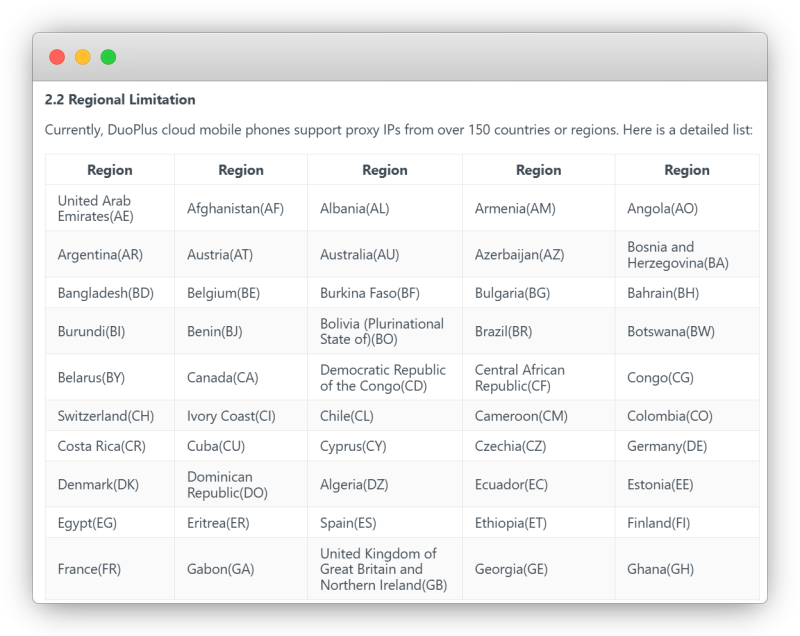
DuoPlus Cloud Phone can assign each account its own cloud-based Android environment, with separated device parameters and network setup.
For teams managing multiple accounts, this creates a cleaner operating structure and reduces the friction of running everything from one local device.
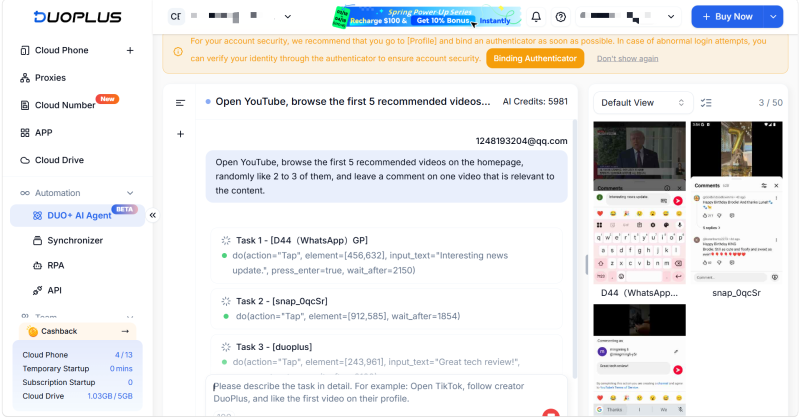
When AI has already generated multiple content variations, such as several title and thumbnail combinations, DuoPlus Cloud Phone can help operators execute repetitive tasks across devices more efficiently through its AI Agent, RPA, or API-based workflows.
This is useful for scheduling uploads,organizing account-specific workflows,syncing predefined operational steps and reducing repetitive manual execution across multiple devices
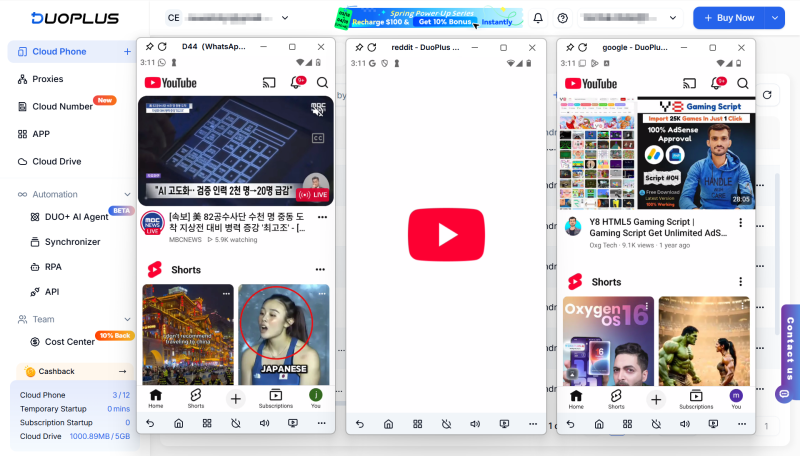
As content volume grows, creators need a system that can support:
That is where a cloud phone setup becomes less of a convenience feature and more of an operations layer.
Core idea: AI helps decide what to produce and how to optimize it.DuoPlus Cloud Phone helps make execution more structured, scalable, and manageable.
Used together, they create a workflow that is much easier to repeat across multiple YouTube channels.
In 2026, YouTube growth is no longer just about making better videos one by one.
It is about building a workflow that can reliably produce, optimize, and execute content at scale.
In that system:
That combination is what makes growth more sustainable.
For creators moving from a single channel to a multi-account setup, this approach often creates more long-term leverage than simply trying to improve content quality in isolation.
Muse has recently become one of the most talked-about AI Agent products in the AI tools space. As a new AI Agent from …

OpenAI Codex is an AI coding agent designed to help developers write, modify, review, and deliver code. It is available …
VK (VKontakte) is one of the major social media platforms in Russia. In addition to account management, content …
No need to purchase multiple real phones.
With DuoPlus, one person can operate numerous cloud phones and social media accounts from a single computer, driving traffic and boosting sales for you.