DuoPlus Cloud Phone vs. Physical Phone
Compare the two solutions across device environments, purchasing and maintenance, scalability, automation capabilities, and team management.
- ARM-Based Cloud Phone Environment

- Browser Access and Remote Control

- AI Agent and Batch Automation

- Dedicated Proxies and Cloud Numbers

- Scalable Operations and Team Collaboration

- Independent Environments and Association Risk Management
*With DuoPlus, you can scale cloud devices on demand without purchasing and maintaining a large number of physical phones.
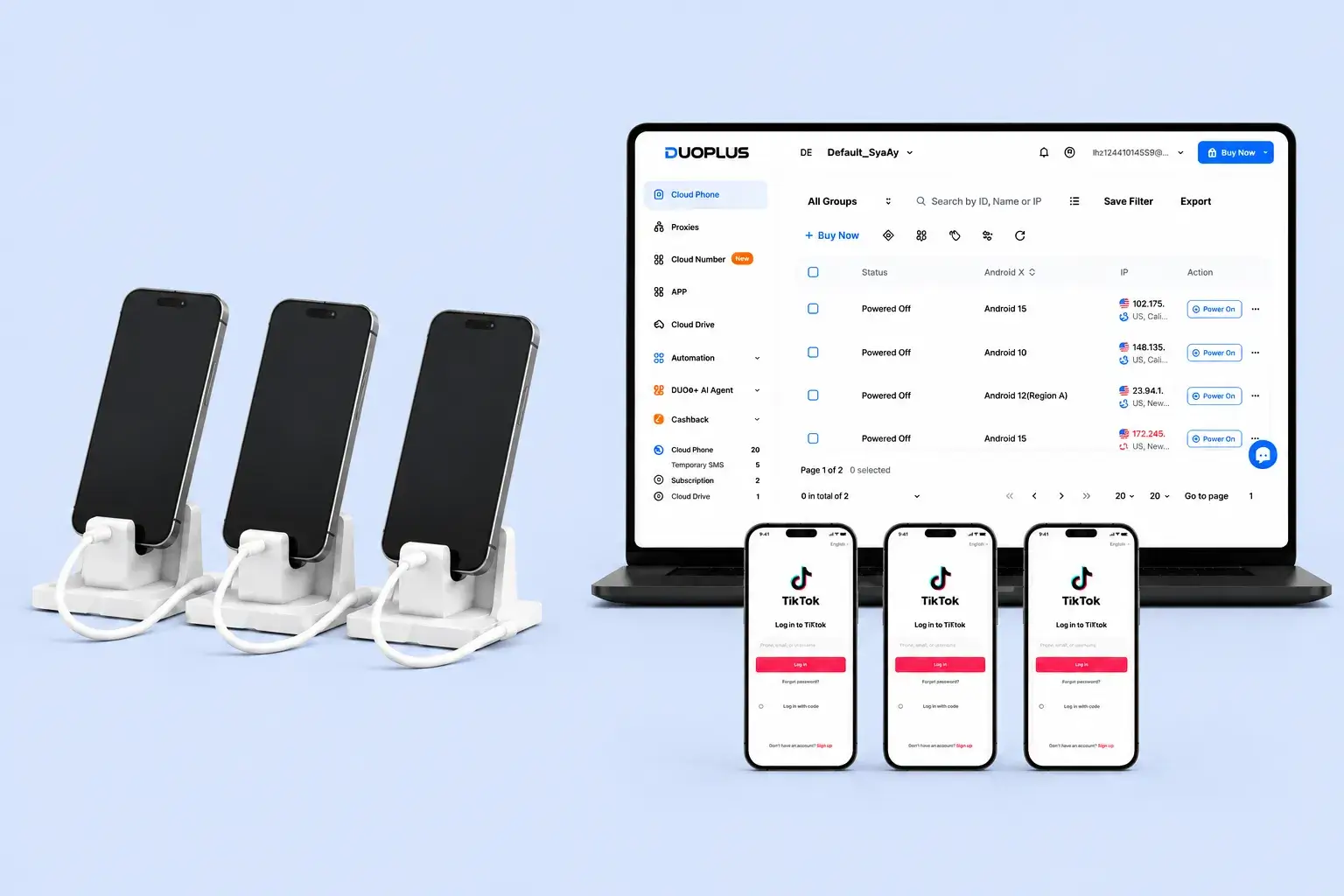
DuoPlus vs. Physical Phone Comparison Chart
A practical comparison focused on individual device use and scalable operations
 | Physical Phone | |
|---|---|---|
Device Acquisition | Create devices online and add more on demand | Purchase, receive, and initialize each device individually |
Runtime Location | Cloud servers | Local physical devices |
Account Association Control | Devices, proxies, and accounts can be mapped one to one | Shared networks, reused information, or cross-login behavior may still create associations |
Environment Reset Method | Redeploy in the cloud without handling physical hardware | Usually requires resetting or flashing each device individually |
Batch Flashing Cost | No need to flash devices individually | High labor, firmware adaptation, and time costs |
Local Space Requirements | Low | Increases with the number of devices |
Power and Charging Maintenance | No user maintenance required | Requires continuous power and battery monitoring |
Independent Device Parameters | Yes | Yes, depending on each physical device |
Independent Proxy Configuration | Yes | Requires individual configuration or a dedicated network solution |
Cloud Number Support | Yes | Usually requires another service |
Online SMS Verification Code Reception | Yes | Available through physical SIM cards or external services |
Operation Synchronization | Yes | Usually requires a device-control tool |
Batch File Distribution | Yes | Usually requires cables or third-party tools |
AI Agent | Yes | No |
RPA Automation | Yes | Usually requires additional tools or development |
Team Permission Assignment | Yes | No |
Remote Collaboration | Available through browser login | Requires remote control or physical device handoff |
Long-Term Online Operation | Does not depend on an office computer or phone remaining powered on | Depends on devices, power, and the local network |
Complete Web-Based Management | Yes | No |
Why Is DuoPlus Better Suited for Multi-Account Teams?
Connect Cloud Phones, SMS Verification, and Automation with DuoPlus
If your priority is the long-term operation of Multiple account portfolios rather than short-term physical-device use or isolated tasks, DuoPlus is more closely aligned with your everyday operations workflow.
Deployment and Operation
Account Association and Device Environment
Batch Operations and Automation
Device Reset and Environment Restoration
Network Isolation and Verification
Team Management and Cost
Built for Smarter Mobile Multi-Account Marketing
- Browser-based access for remote teams and cross-device work
- Cloud numbers for registration, login checks, 2FA, and account binding
- Flexible startup plans with pay-as-you-go and monthly options for easier budgeting
Why Are More Teams Choosing DuoPlus?
DuoPlus Cloud Phone or Physical Phone: Which Is Better for Multi-Account Operations?
Both DuoPlus Cloud Phone and physical phones can run Android apps, but they are designed for different needs. Physical phones provide real hardware, physical SIM cards, NFC, cameras, and sensors, making them suitable for offline use, hardware testing, QR code scanning, and tasks that depend on native device capabilities.
DuoPlus runs Android devices in the cloud and lets users manage them remotely through a browser. It is better suited for teams that need multi-device scaling, remote access, batch automation, cloud numbers, proxy configuration, and team collaboration.
The decision should not be based only on the price of one phone. Teams should also consider device setup time, physical space, power supply, network management, handoffs, hardware failures, batch-operation efficiency, and long-term maintenance costs.
Understand the Core Difference: Physical Hardware vs. Cloud-Based Device Management
A physical phone is a real device owned and operated by the user. Apps and data run directly on the hardware, and users can access native features such as cameras, NFC, Bluetooth, physical SIM cards, sensors, and touch controls. This makes physical phones valuable for tasks that require real hardware or offline operation.
DuoPlus Cloud Phone moves device computing and storage to the cloud. Users can access and control cloud phones through a browser without placing one physical phone on a desk for every account. When users switch computers or work from another location, their cloud devices, apps, and data remain available.
DuoPlus can also support some common physical-device scenarios in a different way. Cloud phones can access a computer camera or receive a video stream, GPS can be virtually mapped based on the device IP location, and cloud numbers can support SMS verification, login checks, 2FA, and long-term number binding.
The key difference is how these capabilities are delivered. Physical phones rely on local hardware, while DuoPlus focuses on centralized cloud management, remote access, environment isolation, and scalable operations.
Scalability and Cost: Do Not Compare Only One Device
For one or two devices, physical phones are simple and direct. Once purchased, they can be used for a long time without cloud-device subscription fees.
As the number of devices grows, however, management becomes more complicated. Teams need to handle purchasing, labeling, setup, charging, storage, networking, repairs, system updates, and replacement. Remote control may also require phone racks, USB hubs, control computers, and additional software.
Physical devices also have lifecycle costs. Batteries degrade, screens and ports can break, and system updates may affect app compatibility. For distributed teams, shipping, handoffs, customs, and device loss can add further expense.
DuoPlus allows teams to add or remove cloud phones according to business needs. Temporary projects can use on-demand runtime, while ongoing projects can use monthly plans. This makes scaling more flexible and reduces the need to purchase and maintain hardware in advance.
If your business uses only a few devices and depends heavily on physical hardware, buying phones may be easier. If device volume is expected to grow, DuoPlus is usually easier to manage over time.
Multi-Account Environments: Devices, Networks, and Verification Should Work Together
A physical phone naturally has real device parameters, but that does not automatically create a complete multi-account environment. If many phones connect to the same router or share similar settings, teams still need to manage IPs, phone numbers, app data, regions, languages, time zones, and account information carefully.
DuoPlus provides each cloud phone with an independent Android environment and device parameters. Apps and third-party proxies can be configured separately, and cloud numbers can receive SMS verification codes.
By managing devices, proxies, phone numbers, and accounts in one dashboard, teams can create clearer one-to-one mappings. For example, one account can be matched with one cloud phone, one proxy, and one verification number. This makes handoffs, troubleshooting, and daily management easier.
No device solution can guarantee absolute account safety. Physical phones also cannot eliminate risks caused by repeated networks, inconsistent account information, or policy-violating behavior. Teams should still follow platform rules and keep account environments consistent.
Batch Automation: Manual Taps vs. Unified Workflows
Physical phones work well for precise manual operations on a small number of devices. Operators can use the touchscreen directly for posting, replying, scanning, verification, and other daily actions.
When the number of devices increases, however, repeating the same actions one by one becomes time-consuming. Unlocking phones, installing apps, transferring content, checking accounts, and switching devices can quickly reduce efficiency.
Physical phones can support batch operations through ADB, scripts, device-control hardware, or third-party systems, but these setups usually require standardized device models, cables, drivers, permissions, and ongoing maintenance.
DuoPlus provides operation synchronization, batch file distribution, RPA templates, and AI Agent capabilities. Operation synchronization supports repeated batch actions, RPA works well for structured processes, and AI Agent can handle more flexible cross-app tasks.
This makes DuoPlus more suitable for teams that need repeatable, reviewable, and scalable mobile workflows instead of manual device-by-device operations.
Team Collaboration and Maintenance: Cloud Devices Make Handoffs Easier
Physical phones are tied to physical locations. When another team member needs to take over, they usually need the actual device, a remote-control setup, or access to a control computer connected to the phone rack.
For remote teams, this can create delays and management risks. Teams may need to handle device shipping, asset ownership, charging issues, hardware damage, and unclear operation records.
DuoPlus supports member permissions, device assignments, and operation logs. Administrators can assign cloud phones based on roles, while team members access authorized devices from their own computers.
When personnel or shifts change, permissions and tasks can be reassigned directly from the dashboard. This is more suitable for remote teams, shift-based operations, outsourced collaboration, and multi-person account management.
For individual users, physical phones may be simple enough. For teams, cloud-based permissions, logs, and device status management can improve security and continuity.
Conclusion: Choose Based on Hardware Needs and Operational Scale
If your workflow depends on physical SIM cards, native cameras, NFC, Bluetooth, sensors, offline QR code scanning, or real mobile hardware, physical phones are usually the better choice.
If your business focuses on managing multiple social media, e-commerce, marketing, or messaging accounts and needs scalable devices, proxies, cloud numbers, batch automation, remote access, and team permissions, DuoPlus is usually a better fit.
The two solutions can also be used together. Hardware-dependent tasks can remain on physical phones, while standardized, remote, and batch-friendly tasks can move to DuoPlus.
The best approach is to start with a small test. Compare setup time, task success rates, manual maintenance hours, device stability, and total cost before deciding how to divide work between physical phones and DuoPlus Cloud Phone.



Head of Growth Operations
Social Media Operations Manager
Affiliate Marketer